

- On Switch A, show the port information.
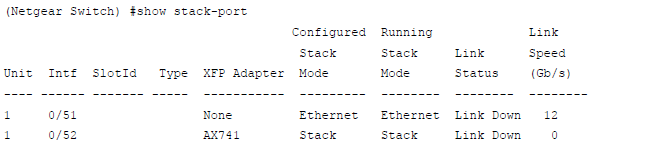
In this case, port 1/0/52 has been configured as stack, so no action is needed.
- On Switch B, show the stack port information.
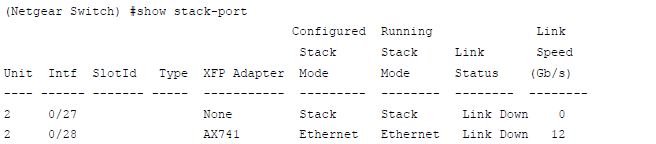
- Since 2/0/28 is in Ethernet mode, it must be changed to stack mode.
(Netgear Switch) (Config)#stack

	(Netgear Switch) (Config-stack)#stack-port 2/0/28 stack

	(Netgear Switch) (Config-stack)#exit

	(Netgear Switch) (Config)
- Reboot Switch B.
(Netgear Switch) #reload

	Management switch has unsaved changes.

	Would you like to save them now? (y/n) n

	Configuration Not Saved!

	Are you sure you want to reload the stack? (y/n) y

	Reloading all switches.
On Switch A, you see the following:
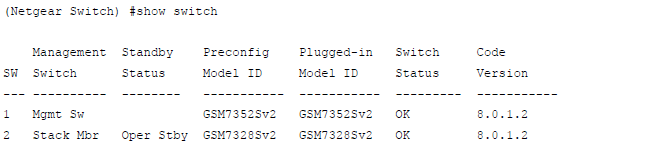
For more information, see the following support articles:
This article applies to the following managed switches and their respective firmware:
- M5300 - firmware version 10.0.0.x
-
- M5300-28G (GSM7228S)
- M5300-5G (GSM7252S)
- M5300-28G3 (GSM7328Sv2h2)
- M5300-52G3 (GSM7352Sv2h2)
- M5300-28G_POE+ (GSM7228PSv1h2)
- M5300-52G-POE+ (GSM7252PSv1h2)
- M5300-28GF3 (GSM7328FSv2)
- XSM7224S - firmware version 9.0.1.x
Last Updated:07/07/2025
|
Article ID: 21900