

Internet Group Management Protocol (IGMP) and Multicast Listener Discovery (MLD) snooping help to limit multicast traffic when member ports are in the same VLAN. However, when ports belong to different VLANs, a copy of the multicast stream is sent to each VLAN with member ports in the multicast group. Multicast VLAN registration (MVR) eliminates the need to duplicate the multicast traffic when multicast group member ports belong to different VLANs.
MVR uses a dedicated multicast VLAN to forward multicast traffic over the Layer 2 network. On a NETGEAR fully managed switch, you can configure a single multicast source VLAN (MVLAN). Such an MVLAN is used only for certain multicast traffic, such as traffic from an IPTV application, to prevent duplication of multicast streams for clients in different VLANs. Clients can dynamically join or leave the MVLAN without interfering with their membership in other VLANs. MVR, like IGMP and MLD snooping, allows a Layer 2 switch to listen to IGMP and MLD messages to learn about multicast group membership.
Configuring MVR in dynamic mode and displaying the MVR status and group members using CLI command consists of six main steps:
- Create a multicast source VLAN (MVLAN) and three regular VLANs: MVLAN 999 and regular VLANs 1001, 1002, and 1003.
- Globally enable MVR, add the configured MVLAN, add a multicast group as an MVR group, and configure MVR in dynamic mode: 224.1.2.3 is the MVR group.
- Add a tagged source port in the MVLAN, add the PVID for the source port, and remove the source port from VLAN 1: port 9 in MVLAN 999 is the source port.
- Add tagged receiver ports in the regular VLANs, add the PVIDs for the receiver ports, and remove the receiver ports from VLAN 1: port 1 in VLAN 1001, port 5 in VLAN 1002, and port 7 in VLAN 1003 are the receiver ports.
Note: A receiver port can participate in one VLAN only. - Display the MVR status on the switch.
- Display the members of the MVR group.
Note: In this configuration, after ports 1, 5, and 7 receive IGMP reports for multicast group 224.1.2.3, the ports are dynamically (automatically) added to MVR group 224.1.2.3.
For information about using the main user interface (UI) to configure MVR in dynamic mode, see How do I configure Multicast VLAN Registration (MVR) in dynamic mode using the main user interface on my NETGEAR fully managed switch?
To configure MVR in dynamic mode using CLI commands on a NETGEAR fully managed switch:
- Create MVLAN 999, VLAN 1001, VLAN 1002, and VLAN 1003:
(Netgear Switch) #vlan database

	(Netgear Switch) (Vlan)#vlan 999,1001, 1002, 1003

	(Netgear Switch) (Vlan)#vlan name 999 mVlan

	(Netgear Switch) (Vlan)#vlan name 1001 VLAN1001

	(Netgear Switch) (Vlan)#vlan name 1002 VLAN1002

	(Netgear Switch) (Vlan)#vlan name 1003 VLAN1003

	(Netgear Switch) (Vlan)#exit
- Enable MVR, configure VLAN 999 as the MVLAN, add group 224.1.2.3 as an MVR group, and configure MVR in dynamic mode:
(Netgear Switch) #config

	(Netgear Switch) (Config)#mvr

	(Netgear Switch) (Config)#mvr vlan 999

	(Netgear Switch) (Config)#mvr group 224.1.2.3

	(Netgear Switch) (Config)#mvr mode dynamic
- Configure the tagged source port in the MVLAN, add the PVID for the source port, and remove the source ports from VLAN 1
(Netgear Switch) (Config)#interface 0/9

	(Netgear Switch) (Interface 0/9)#vlan participation include 999

	(Netgear Switch) (Interface 0/9)#vlan tagging 999

	(Netgear Switch) (Interface 0/9)#vlan pvid 999

	(Netgear Switch) (Interface 0/9)#vlan participation exclude 1

	(Netgear Switch) (Interface 0/9)#mvr

	(Netgear Switch) (Interface 0/9)#mvr type source

	(Netgear Switch) (Interface 0/9)#exit
- Configure the tagged receiver ports in the regular VLANs, add the PVIDs for the receiver ports, and remove the receiver ports from VLAN 1:
(Netgear Switch) (Config)#interface 0/1

	(Netgear Switch) (Interface 0/1)#vlan participation include 1001

	(Netgear Switch) (Interface 0/1)#vlan tagging 1001

	(Netgear Switch) (Interface 0/1)#vlan pvid 1001

	(Netgear Switch) (Interface 0/1)#vlan participation exclude 1

	(Netgear Switch) (Interface 0/1)#mvr

	(Netgear Switch) (Interface 0/1)#mvr type receiver

	(Netgear Switch) (Interface 0/1)#exit


	(Netgear Switch) (Config)#interface 0/5

	(Netgear Switch) (Interface 0/5)#vlan participation include 1002

	(Netgear Switch) (Interface 0/5)#vlan tagging 1002

	(Netgear Switch) (Interface 0/5)#vlan pvid 1002

	(Netgear Switch) (Interface 0/5)#vlan participation exclude 1

	(Netgear Switch) (Interface 0/5)#mvr

	(Netgear Switch) (Interface 0/5)#mvr type receiver

	(Netgear Switch) (Interface 0/5)#exit


	(Netgear Switch) (Config)#interface 0/7

	(Netgear Switch) (Interface 0/7)#vlan participation include 1003

	(Netgear Switch) (Interface 0/7)#vlan pvid 1003

	(Netgear Switch) (Interface 0/7)#vlan tagging 1003

	(Netgear Switch) (Interface 0/7)#vlan participation exclude 1

	(Netgear Switch) (Interface 0/7)#mvr

	(Netgear Switch) (Interface 0/7)#mvr type receiver

	(Netgear Switch) (Interface 0/7)#exit
- Display the MVR status:
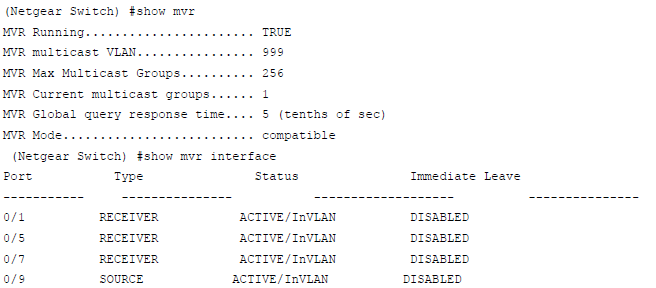
- Display the members of the MVR group:
Note: After port 1 receives an IGMP report for multicast group 224.1.2.3, the port is dynamically (automatically) added to the MVR group 224.1.2.3.
