

The script in this section shows how to set up auto VoIP system-wide.
- Enable auto VoIP on all the interfaces in the device.
(Netgear Switch) (Config)# auto-voip all
- View the auto VoIP information:
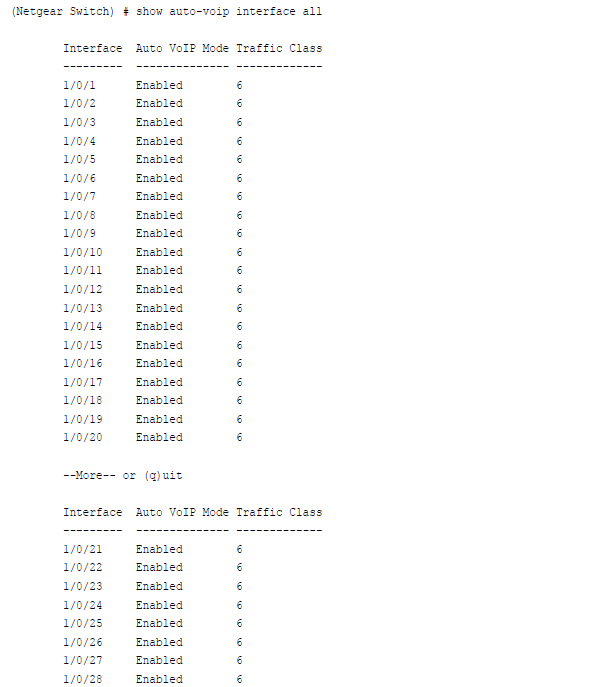
Auto VoIP classifies and prioritizes the packets and places only the packets in the higher-priority queue. In the previous example, ithey are placed in queue 6. You can override the egress queue setting using the commands cos-queue strict or cos-queue min-bandwidth if you want.
For more infomation, see the following support articles:
- What is the Auto-VoIP featere and how does it work with my M5300 managed switch?
- How do I configure Auto-VoIP using the web interface on my M5300 managed switch?
This article applies Version 10.x or above firmware on the following switches:
- M5300-28G (GSM7228S)
- M5300-5G (GSM7252S)
- M5300-28G3 (GSM7328Sv2h2)
- M5300-52G3 (GSM7352Sv2h2)
- M5300-28G_POE+ (GSM7228PSv1h2)
- M5300-52G-POE+ (GSM7252PSv1h2)
- M5300-28GF3 (GSM7328FSv2)
Last Updated:07/07/2025
|
Article ID: 21759