

This example adds support for OSPF to the configuration below.
The diagram in this article shows a Layer 3 switch configured for port routing. It connects two VLANs, with two ports participating in one VLAN, and one port in the other.
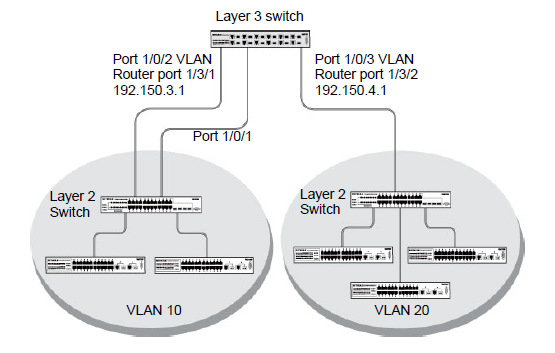
- Configure the M5300 Managed Switch as an inter-area router.
(Netgear Switch) #vlan data

	(Netgear Switch) (Vlan)#vlan 10

	(Netgear Switch) (Vlan)#vlan 20

	(Netgear Switch) (Vlan)#vlan routing 10

	(Netgear Switch) (Vlan)#vlan routing 20

	(Netgear Switch) (Vlan)#exit

	(Netgear Switch) #conf

	(Netgear Switch) (Config)#ip routing

	(Netgear Switch) (Config)#vlan port tagging all 10

	(Netgear Switch) (Config)#vlan port tagging all 20

	(Netgear Switch) (Config)#interface 1/0/2

	(Netgear Switch) (Interface 1/0/2)#vlan participation include 10

	(Netgear Switch) (Interface 1/0/2)#vlan pvid 10

	(Netgear Switch) (Interface 1/0/2)#exit

	(Netgear Switch) (Config)#interface 1/0/3

	(Netgear Switch) (Interface 1/0/3)#vlan participation include 20

	(Netgear Switch) (Interface 1/0/3)#vlan pvid 20

	(Netgear Switch) (Interface 1/0/3)#exit

	(Netgear Switch) (Config)#interface vlan 10

	(Netgear Switch) (Interface vlan 10)#ip address 192.150.3.1 255.255.255.0

	(Netgear Switch) (Interface vlan 10)#exit

	(Netgear Switch) (Config)#interface vlan 20

	(Netgear Switch) (Interface vlan 20)#ip address 192.150.4.1 255.255.255.0

	(Netgear Switch) (Interface vlan 20)#exit
- Specify the router ID and enable OSPF for the switch.
(Netgear Switch) (Config)#router ospf

	(Netgear Switch) (Config router)#router-id 192.150.9.9

	(Netgear Switch) (Config router)#enable

	(Netgear Switch) (Config router)#exit
- Enable OSPF for the VLAN and physical router ports.
(Netgear Switch) (Config)#interface vlan 10

	(Netgear Switch) (Interface vlan 10)#ip ospf areaid 0.0.0.2

	(Netgear Switch) (Interface vlan 10)#ip ospf

	(Netgear Switch) (Interface vlan 10)#exit

	(Netgear Switch) (Config)#interface vlan 20

	(Netgear Switch) (Interface vlan 20)#ip ospf areaid 0.0.0.3

	(Netgear Switch) (Interface vlan 20)#ip ospf

	(Netgear Switch) (Interface vlan 20)#exit
- Set the OSPF priority and cost for the VLAN and physical router ports.
(Netgear Switch) (Config)#interface vlan 10

	(Netgear Switch) (Interface vlan 10)#ip ospf priority 128

	(Netgear Switch) (Interface vlan 10)#ip ospf cost 32

	(Netgear Switch) (Interface vlan 10)#exit

	(Netgear Switch) (Config)#interface vlan 20

	(Netgear Switch) (Interface vlan 20)#ip ospf priority 255

	(Netgear Switch) (Interface vlan 20)#ip ospf cost 64

	(Netgear Switch) (Interface vlan 20)#exit

	(Netgear Switch) (Config)#exit
For more information, see the following support articles:
This article applies to the following managed switches and their respective firmware:
- M5300 - firmware version 10.0.0.x
-
- M5300-28G (GSM7228S)
- M5300-5G (GSM7252S)
- M5300-28G3 (GSM7328Sv2h2)
- M5300-52G3 (GSM7352Sv2h2)
- M5300-28G_POE+ (GSM7228PSv1h2)
- M5300-52G-POE+ (GSM7252PSv1h2)
- M5300-28GF3 (GSM7328FSv2)
- XSM7224S - firmware version 9.0.1.x (license required to support the feature described in this article)
Last Updated:07/07/2025
|
Article ID: 21692