

The following figure depicts an nssa Area.
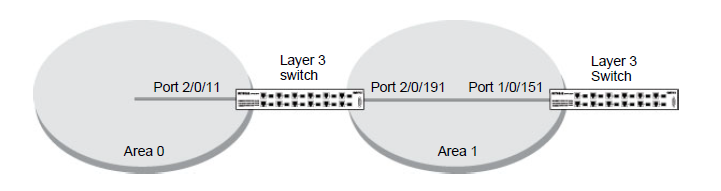
- Enable routing on the switch.
(Netgear Switch) #config

	(Netgear Switch) (Config)#ip routing

	(Netgear Switch) (Config)#router ospf
- Set the router ID to 2.2.2.2.
(Netgear Switch) (Config-router)#router-id 2.2.2.2
- Configure the area 0.0.0.1 as an nssa area.
(Netgear Switch) (Config-router)# area 0.0.0.1 nssa
- Redistribute the RIP routes into the OSPF.
(Netgear Switch) (Config-router)#redistribute rip

	(Netgear Switch) (Config-router)#redistribute rip subnets
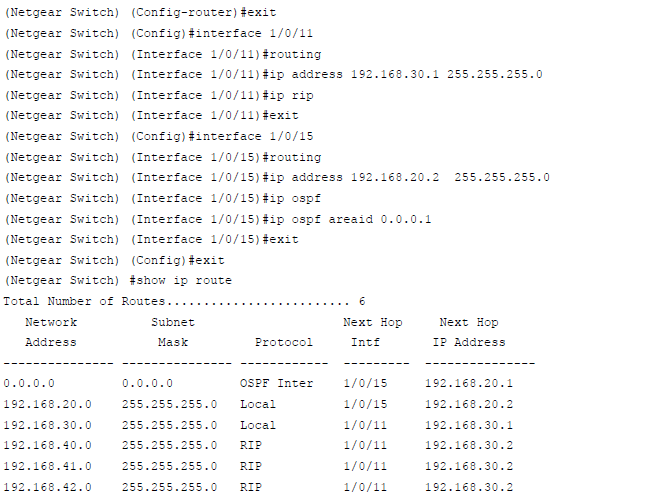
- Enable OSPF area 0.0.0.1 on port 1/0/15.
This article applies to the following managed switches and their respective firmware:
- M5300 - firmware version 10.0.0.x
-
- M5300-28G (GSM7228S)
- M5300-5G (GSM7252S)
- M5300-28G3 (GSM7328Sv2h2)
- M5300-52G3 (GSM7352Sv2h2)
- M5300-28G_POE+ (GSM7228PSv1h2)
- M5300-52G-POE+ (GSM7252PSv1h2)
- M5300-28GF3 (GSM7328FSv2)
- XSM7224S - firmware version 9.0.1.x (license required to support the feature described in this article)
Last Updated:07/07/2025
|
Article ID: 21688