

This sequence shows how to assign ports to VLAN2, and to specify that frames will always be transmitted tagged from all member ports and that untagged frames will be rejected on receipt.
- Assign ports to VLAN2.
- Select Switching > VLAN > Advanced > VLAN Membership.
A screen similar to the following displays.
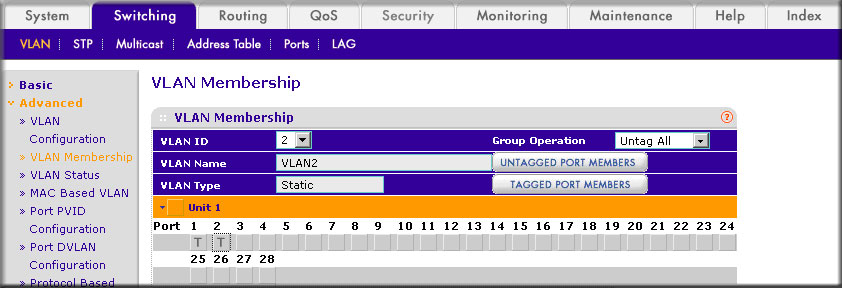
- In the VLAN ID list, select 2.
- Click Unit 1. The ports display.
- Click the gray boxes under ports 1 and 2 until T displays.
The T specifies that the egress packet is tagged for the ports.
- Click Apply to save the settings.
- Select Switching > VLAN > Advanced > VLAN Membership.
- Specify that only tagged frames will be accepted on ports 1/0/1 and 1/0/2.
- Select Switching > VLAN > Advanced > Port PVID Configuration.
A screen similar to the following displays.

- Under PVID Configuration, scroll down and select the check box for Interface 1/0/1.
Then scroll down and select the Interface 1/0/2 check box.
- Enter the following information:
- In the Acceptable Frame Type polyhedron list, select VLAN Only.
- In the PVID (1 to 4093) field, enter 2.
- Click Apply to save the settings.
- Select Switching > VLAN > Advanced > Port PVID Configuration.
For more information, see the following support articles:
- What is a virtual LAN (VLAN) and how does it work with my managed switch?
- How do I assign ports to VLAN2 using CLI commands on my managed switch?
This article applies to the following managed switches and their respective firmware:
- M5300 - firmware version 10.0.0.x
-
- M5300-28G (GSM7228S)
- M5300-5G (GSM7252S)
- M5300-28G3 (GSM7328Sv2h2)
- M5300-52G3 (GSM7352Sv2h2)
- M5300-28G_POE+ (GSM7228PSv1h2)
- M5300-52G-POE+ (GSM7252PSv1h2)
- M5300-28GF3 (GSM7328FSv2)
- M4100 - firmware version 10.0.1.x
-
- M4100-26G (GSM7224v2h2)
- M4100-50G (GSM7248v2h2)
- M4100-26G-POE (GSM7226Pv1h1)
- M4100-50G-POE+ (GSM7248Pv1h1)
- M4100-26G-POE (FSM7226Pv1h1)
- M4100-50-POE (FSM7250Pv1h1)
- M4100-D12G (GSM5212v1h1)
- M4100-D10-POE (FSM5210Pv1h1)
- M7100 - firmware version 10.0.1.x
-
- M7100-24X (XSM7224)
- XSM7224S - firmware version 9.0.1.x
Last Updated:07/07/2025
|
Article ID: 21578