

The WPN802 repeating feature lets two distant sections of a wireless network communicate, without having to provide uniform coverage over a huge single huge area.
In repeating, one access point is the root access point (configured in "access point mode"), and the other is the repeater (configured in "repeater mode"). In the diagram, the dotted line is the repeating link between two access points, the solid lines are wired connections, and the lightning bolts are links to a wireless stations such as laptops. The instructions explain configuring access points A and B.
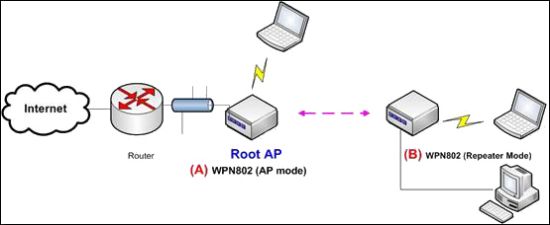
Notes:
- WPA/PSK security does not work with repeating.
- 64-bit or 128-bit WEP is optional.
- If using access control list (ACL) on the root access point, be sure to add the repeater access point's MAC address to the ACL.
To configure, you need:
- To choose an SSID that the access points will use.
- If using WEP, to chose a passphrase the access points will use.
- If using an ACL, to find the MAC address of the access point used as a repeater.
- To change at least one of the access point's default IP addresses, so you don't have two with the same. (Not included in the instructions.)
To configure root access point A:
- On the administration screen, select Wireless Settings. The Wireless Settings window appears.
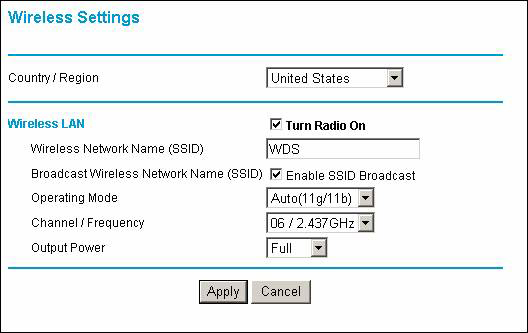
- Select the country where you live.
- Enter an SSID for Access Point A.
- Select a channel. Both access points must use the same channel.
- Click Apply.
- If using WEP:
- Select Security > WEP/WPA Settings.
- Select Network Authentication > Open System. The WEP/WPA Settings window appears.
- Select Data Encryption > 64 bits WEP (128-bit is fine and slightly more secure, but it's slower.).
- Enter a passphrase.
- Click Generate Keys.
- Click Apply.
To configure repeater access point B:
- If you turn on the MAC control list on the root access point, then add the repeater's MAC address on the list.
- On the administration screen, select Wireless Settings. The Wireless Settings window appears.
- Select the country where you live.
- Enter the same SSID as you did for Access Point A, above.
- Select the same channel as you did for Access Point A.
- Click Apply.
- If using WEP, select Security > WEP/WPA Settings. Use the same settings you used to configure Access Point A.
- Select Advanced > Access Point Settings, and select Enable Wireless Repeating.
To complete the process, you must turn off Access Point B, and reboot the Root Access Point A. When Access Point A is finished booting, turn on Access Point B. When Access Point B has a lit wireless LED, the repeater function is working.
For more information about Access Control or MAC Control list, please visit this article:
Introduction to wireless security