

Use FrontView to tune your ReadyNAS storage system for better performance.
To optimize system performance, follow these steps:
- Select System > Performance from the FrontView main menu.
The Performance Options screen displays.
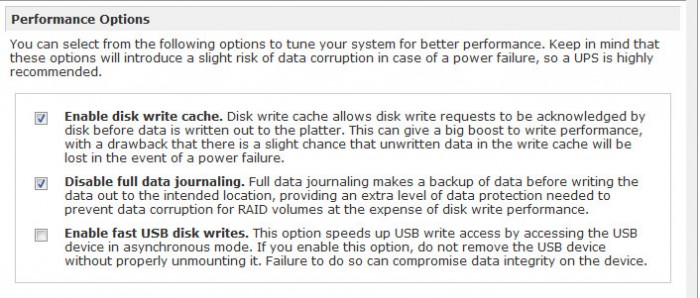
- (Optional) Select the Enable disk write cache check box.
Enabling this option allows disk write requests to be acknowledged by the disk before data is written to the disk. This can give a big boost to write performance; however, this option introduces the slight risk that unwritten data in the write cache will be lost if power fails.
- (Optional) Select the Disable full data journaling check box.
Disabling full data journaling improves disk performance at the expense of data protection. Full data journaling makes a backup of data before writing the data out to the intended location, which provides the extra level of data protection needed to prevent data corruption for RAID volumes at the expense of disk write performance.
- (Optional) Select the Enable fast USB disk writes check box.
Enabling this option speeds USB write access by accessing the USB device in asynchronous mode. If you enable this option, never remove the USB device without correctly unmounting it. Incorrectly removing your USB device when this option is enabled can cause data on the USB device to become corrupted.
- Click the Apply button.
Your settings are saved.
Last Updated:07/07/2025
|
Article ID: 21338