

You can monitor a UPS that is not directly connected to your ReadyNAS system in two ways:
- Monitor a UPS connected to another ReadyNAS system on your LAN. If this ReadyNAS system is not connected to a UPS device and you have more than one ReadyNAS system, you can enable a UPS connection to another ReadyNAS device. If you use this option, the ReadyNAS system gracefully shuts down automatically when a low battery condition is detected on a UPS connected to another ReadyNAS. This is useful when a UPS is shared by multiple ReadyNAS systems, even though only one ReadyNAS system is monitoring the battery status.
- Monitor a SNMP UPS on your LAN. If your ReadyNAS unit is connected to a LAN that has an SNMP UPS, you can configure your ReadyNAS system to shut down automatically when a low battery condition is detected.
In the following procedure, the remote ReadyNAS system is the system that has the UPS directly connected to it. The local ReadyNAS system is the system that does not have a UPS directly connected to it.
To configure remote UPS low battery shutdown, follow these steps:
- Ensure that the remote ReadyNAS system is configured to allow remote UPS monitoring:
- On the remote ReadyNAS system, select System > Power from the FrontView main menu.
- Scroll down to the UPS Configuration pane.
- Click the Enable network sharing of attached UPS check box.
- Choose an access restriction option, as follows:
- Leave the Hosts allowed access field blank to allow any system on you LAN to share this UPS.
- Enter the IP address of the local ReadyNAS system in the Hosts allowed access field to restrict sharing of this UPS to only that ReadyNAS system.
- Click the Apply button.
- On your local ReadyNAS system, select System > Power from the FrontView main menu.
The Power screen displays.
- Scroll down to the UPS Configuration pane.
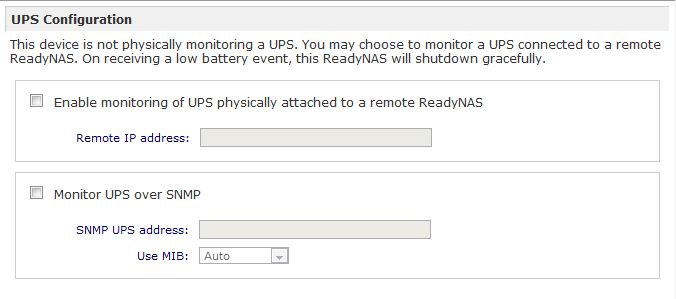
- (Optional) Select the Enable monitoring of UPS physically attached to a remote ReadyNAS check box and enter the IP address of the remote ReadyNAS system in the Remote IP address field.
- (Optional) Select the Monitor UPS over SNMP check box, enter the SNMP UPS address, and choose an option from the Use MIB drop-down list.
For more information about MIB settings, see the hardware manual for your system, see the ReadyNAS Documentation support article.
- Click the Apply button.
Your settings are saved.
Last Updated:07/07/2025
|
Article ID: 21335