

You can recover a lost or forgotten administrator password in two ways:
- Use the NETGEAR password recovery tool. This web-based tool requires that you enable administrator password recovery on your ReadyNAS storage system before you can use it.
-
- Using a web browser, visit https://<ReadyNAS_IP_address>/password_recovery.
<ReadyNAS_IP_address> is the IP address of your ReadyNAS system.
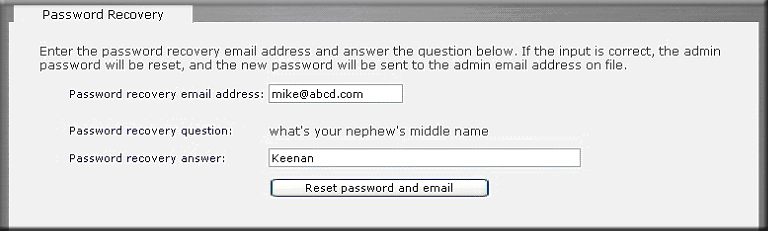
- Enter the email address and password recovery answer you enabled on your ReadyNAS storage system and click the Reset password and email button.
NETGEAR resets your administrator password and sends an email message with the new password to you.
Note: This procedure is an option only if you enabled password recovery by providing a password recovery question, answer, and email address as described in the "How do I change the administrator password on my Duo v2 or NV+ v2?" support article. If you lost your password but did not enable administrator password recovery, you must perform an OS reinstall reboot to reset the administrator user name and password to factory defaults.
- Using a web browser, visit https://<ReadyNAS_IP_address>/password_recovery.
- Perform an OS reinstall reboot. This process reinstalls the firmware on your system and resets the administrator user name and password to factory defaults. The process for performing an OS reinstall reset reboot varies by storage system.
For more information about how to perform a factory reset reboot on a Duo v2 or NV+ v2, see the following articles:
Last Updated:07/07/2025
|
Article ID: 21012