

The ProSECURE family consists of all UTM and STM series products.
These ProSECURE devices can be purchased with a licence bundle included, or a licence can be purchased separately (usually when renewing a licence after expiry).
This licence will subscribe the device to one or more of the following services:
- Web Protection
Protection from viruses, worms, spyware, trojans, rootkits, keyloggers, and unauthorized Web surfing. - Email Protection
Protection from spam and email malware/viruses. - Maintenance & Support
Allow firmware upgrades. Allow IPS use. Includes NBD replacement service for hardware warranty and access to premium support number.
Click here for more info on UTM products. A license needs to be activated against the ProSECURE product before the services become enabled.
NETGEAR currently is only allowing customers to register and activate Email or Web Subscription licenses with terms expiring on or before December 31, 2016. Subscription licenses with expiration dates beyond December 31, 2016 will be adjusted to have an end date of December 31, 2016.
How do I get my license key?
When a license is purchased, it can be in one of three forms:
- An electronic license
- A printed license key card
- A license key received via email from your NETGEAR VAR or reseller
A license needs to be activated against the ProSECURE product before the services become enabled.
Note 1: Activating the license initiates their term of use and should only be done when you are ready to start using the product. If your product has never been registered before, you can use the 30 day trial option for all 3 types of services to perform the initial testing and configuration.
Note 2: Electronic licenses were introduced in place of printed license key cards on some ProSECURE products in April 2011.
What is the difference between an electronic license, a printed license key card and a license key received via email from a reseller?
An electronic license will mean that there is no printed license key card included with the ProSECURE product. It is entirely electronic and means that the serial number of the product will be tied to a license on the NETGEAR licensing servers.
A Printed license key card will look similar to the picture below and will be included in the ProSECURE product box:
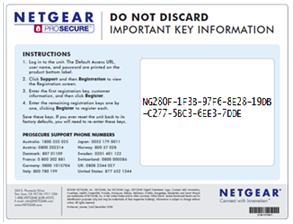
A license key received via email from your reseller will be an email which includes an actual license key similar to that printed on the license card in the screenshot above.
When I buy a ProSECURE product with a license bundle, how do I know if my product has an electronic license or printed license key card?
Depending on the product purchased, the license will either be in the form of an electronic license or a printed license key card.
When purchased with a license bundle, the following ProSECURE products are issued with a printed license key card in the box:
- UTM5
- UTM10
- UTM50
When purchased with a license bundle, the following ProSECURE products are issued with an electronic license:
- UTM9S
- UTM25S
- UTM25
- UTM150
- STM150
- STM300
- STM600
How do I activate my electronic license?
Before activating the license, ensure that the ProSECURE product is connected to the internet. Refer to the product reference manual if you require assistance with configuring your internet connection.
To activate the license:
- Log on to the web interface of the product
- Go to Support -> Registration - Enter the customer/reseller information and press Register (it is not necessary to enter a license key in this case)
- A message will confirm if registration is successful
How do I activate my printed license key card?
Before activating the license, ensure that the ProSECURE product is connected to the internet. Refer to the product reference manual if you require assistance with configuring your internet connection.
To activate the license:
- Log on to the web interface of the product
- Go to Support -> Registration
- Enter the first registration key found on the printed license key card and also enter the customer/reseller information
- Press Register
- A message will confirm if registration is successful
- Repeat this step for any remaining keys
How do I activate my license key received via email from my reseller?
Before activating the license, ensure that the ProSECURE product is connected to the internet. Refer to the product reference manual if you require assistance with configuring your internet connection.
To activate the license:
- Log on to the web interface of the product
- Go to Support -> Registration
- Enter the first registration key found in the email and also enter the customer/reseller information
- Press Register
- A message will confirm if registration is successful
- Repeat this step for any remaining keys
What happens if my licenses have expired, and several weeks or months have passed before I purchase a new license?
We encourage you to renew your license on time to avoid any backdating penalty and take advantage of existing and new features.
If your license has expired before renewal this is the NETGEAR License policy:
For email (E) web(W) and maintenance(M) licenses purchased separately (i.e. not in an email, web and maintenance bundle (B)).
Email & Web license when activated, will not be backdated and the service will be enabled from date of activation.
If the maintenance license has expired then the new maintenance license will be backdated a maximum of 3 months.
For email, web and maintenance bundle license pack (B) All 3 licenses will be backdated a maximum of 3 months, no matter how long ago the existing license expired. The existing maintenance license expiry date determines if all licenses will backdate or not. All 3 licenses will have the same new expiry date in the future after activation. This is for ease of management at next renewal date. If the expired date is within 3 months of new activation the license will only back date to that date.
Example 1: If the maintenance license has expired over 6 months ago and then you purchase a 1 year bundle pack. All 3 licenses will be backdated 3 months, all 3 license will expire in 9 months.
Example 2: If the maintenance license has expired exactly 1 month ago and then you purchase a new 3 year bundle pack. All 3 licenses will backdate 1 month, all 3 license will expire in 2 years and 11 months.
Example 3: If you had a web and maintenance contract only that has expired exactly 2 months ago. If you then purchase and activate a new 1 year maintenance and web license. The web license will start from date of activation. The maintenance license will backdate 2 months and expire in 10 months.
Note: When purchasing licensing for a new unit or a unit with all license expired minimum license purchase should include a maintenance license.
If at time of purchase a maintenance license and only a web or email license was activated previously this is equivalent to a maintenance license that has expired at time of register the web or email license and the backdate policy above will apply.