

Bug Fixes / Enhancements:
- Added the boot loader version on hidden page.
- Added the function of check firmware updates.
- Per NETGEAR request, the WPS client must to clone all of wireless settings from the ROOT AP even it worked in WPA/WPA2-PSK mode.
- Fixed bug of the collision value of statistics page is always zero.
- Fixed bug of the Device name is always displayed “Unknow” on the Network Device page.
- Fixed the interaction issue between UI and PC utility once the device name was changed.
- Fixed the IOP issue of WPS client with JWNR2000 work in WEP-auto mode and the key index is not 1.
- Fixed the bug to prevent the users input invalid characters on device name.
- Fixed the NMRP fail issue with NMRP server.
- Support the Keep-Alive REQ in NMRP mode.
- Update the PIB to disable the IGMP timeout and enable QoS' TX buffer.
- Added a patch to support the IGMP join packet forwarding between LAN port
Known Issue:
-
PLC LINK LED blinking issue (Atheros processing).
-
When we push hardware WPS button 3 seconds, Wi-Fi LED and power LED will blinking. During WPS is in progress, if we push hardware WPS button 3 seconds again, power LED will not blinking. (Atheros button spc.)
Installation Instructions:
- Download the firmware using the button below and save the file to a convenient location such as the desktop. Unzip if needed.
 2.13 MB
 - Login the XAVN2001 HTTP WEB GUI and upgrade the firmware.
- You canget YOUR XAVN2001 IP address information from powerline utility. This is an example for XAVN2001 IP address.
-
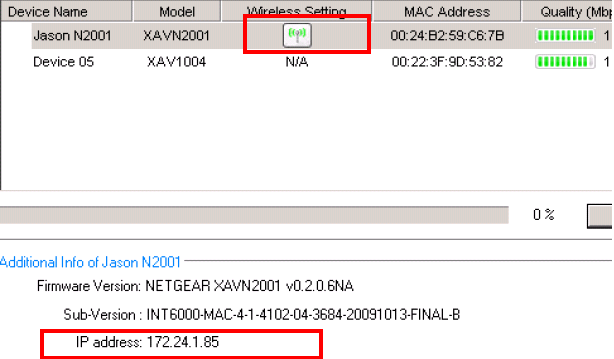
- Open the IE and input the ip address (or click the wireless icon). You can login the web configuration and upgrade the firmware from firmware upgrade options.
- Please do hardware/software factory reset after you upgrade the firmware. ?> Very important
Last Updated:10/17/2025
|
Article ID: 20086