

Authentication means making sure that something is what it claims to be. E.g., in online banking, you want to make sure that the remote computer is actually your bank, and not someone pretending to be your bank. The purpose of 802.1x is to accept or reject users who want full access to a network using 802.1x. It is a security protocol that works with 802.11 wireless networks such as 802.11b,g,n, as well as with wired devices.
- All NETGEAR ProSAFE Layer 2 and Layer 3 switches support this authentication.
- NETGEAR access points with full WPA (WPA Enterprise) support 802.1x, e.g., WG103, WNDAP350, WNDAP360.
Details of 802.1x authentication:
The main parts of 802.1x Authentication are:
- A supplicant, a client end user, which wants to be authenticated.
- An authenticator (an access point or a switch), which is a "go between", acting as proxy for the end user, and restricting the end user's communication with the authentication server.
- An authentication server (usually a RADIUS server), which decides whether to accept the end user's request for full network access.
In a wireless network, 802.1x is used by an access point to implement WPA. In order to connect to the access point, a wireless client must first be authenticated using WPA.
In a wired network, switches use 802.1x in a wired network to implement port-based authentication. Before a switch forwards packets through a port, the attached devices must be authenticated. After the end user logs off, the virtual port being using is changed back to the unauthorized state.
A benefit of 802.1x is the switches and the access points themselves do not need to know how to authenticate the client. All they do is pass the authentication information between the client and the authentication server. The authentication server handles the actual verification of the client’s credentials. This lets 802.1x support many authentication methods, from simple user name and password, to hardware token, challenge and response, and digital certificates.
802.1x uses EAP (Extensible Authentication Protocol) to facilitate communication from the supplicant to the authenticator and from the authenticator to the authentication server.
This diagram shows the steps of 802.1x and EAP used in authenticating a supplicant:
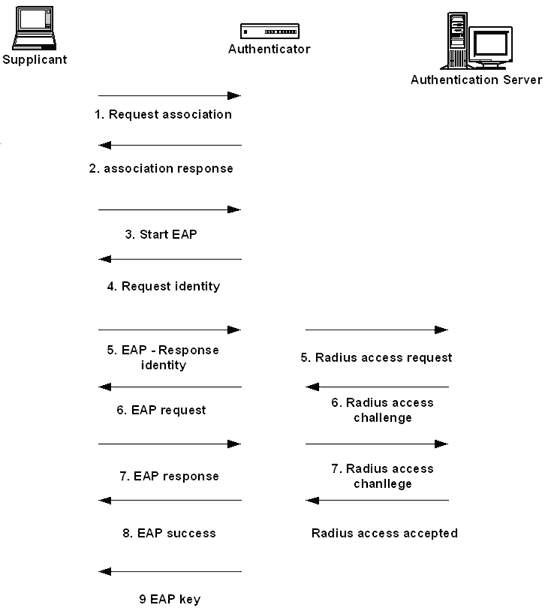
EAP supports various authentication methods. As a user seeking authentication, you just need to use a method supported by the authentication server. As an administrator, you need to select which methods your server will use. EAP-TLS is widely supported. It uses PKI (e.g., a digital certificate) to authenticate the supplicant and authentication server.
- EAP-MD5 uses standard user name and password. The supplicant’s password is hashed with MD5 and the hash value is being used to authenticate the supplicant.
- LEAP is Cisco’s Lightweight EAP, and works mainly with Cisco products. It also uses MD5 hash, but both the supplicant and authentication server are authenticated.
- EAP-TTLS uses PKI to authenticate the authentication server. However, it supports a different set of authenticate methods (e.g. CHAP, PAP, MS-CHAP v2) to authenticate the supplicant.
- PEAP (Protected EAP), which is built-in to Windows XP, uses PKI to authenticate the authentication server. It supports any type of EAP to authenticate the supplicant including certificate.
***Windows 7+ OS versions have a service ' Wired AutoConfig' which is set to manual as default. Set this to automatic and it should begin working.