

async mode for NFS will increase the write performance of the ReadyNAS. By default, it is turned off.
What async mode does is acknowledge Write commands, before the data is actually committed to disk, by manipulating the system sending NFS requests.
If electric power is lost during the flush-to-disk cycle, it is possible that data corruption or loss will take place. Therefore, it is advised that the NAS is powered by an Uninterruptable Power Supply (UPS).
Enabling async
- Click on Shares
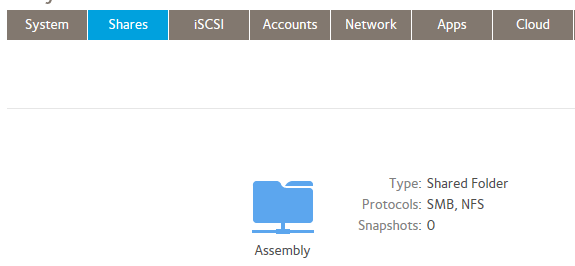
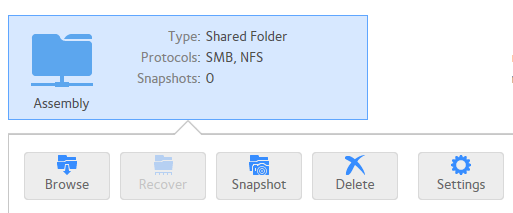
- Select the Share you wish to use. Left mouse Click on the Share icon. Click on Settings.
- Click on Network access. Enable NFS if not already done so.
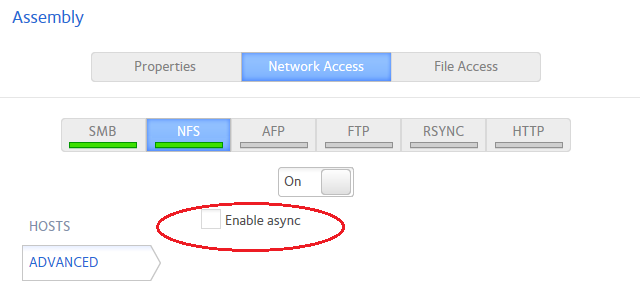
The 'Enable ayync' check box is as shown. After selection, click apply.
Recommendations:
- It is advised to have the ReadyNAS connected on an Uninterruptable Power Supply.
- It is advised that the network is a dedicated storage area network (SAN), and also connected to the UPS to prevent network errors.
- Its best if you use the NAS units for backups, as opposed to a production environment.
- Be sure to perform a verification process on the backup once it completes.
Further References:
For a detailed explanation of ASYNC mode, see section 5.9 in the following link.
Synchronous vs. Asynchronous Behavior in NFS
NFS is a File Sharing protocol. It allows all network users to access shared files stored on computers of different types. http://kb.iu.edu/data/adux.html