

The NETGEAR RANGEMAX Dual Band Wireless-N Gigabit Router (WNDR3700) is the newest and top of the line flagship product from NETGEAR - full featured and high performance.
Key Features of the WNDR3700
- Simultaneous Dual-band Wireless-N operation with two 802.11n radios running simultaneously at 2.4 GHz and 5 GHz band, offering twice the bandwidth.
- Gigabit Ethernet ports for ultra-fast wired connections
- ReadySHARE (TM) USB Storage Access for fast and easy shared access to external USB storage devices supporting multiple file formats (FAT16, FAT32, NTFS, EXT2, EXT3)
- ReadyDLNA - Plays USB External Storage content on DLNA/UPnP AV devices like EVA2000, XBox360, PS3, DLNA compliant TVs
- Enterprise-class wireless security with WPA and WPA2-enterprise encryption
- Multiple SSID support for setting up a second network for guests with restricted LAN access or a dedicated 5GHz network for video and gaming
- Broadband usage meter ensures measurement of Internet traffic daily, weekly and monthly with customized alerts
- High WAN to LAN throughput of over 500 Mbps
- Dedicated video network in 5 GHz band for streaming high-quality HD video, reducing jitter and packet loss
- Convenient one touch on/off switch and Wi-Fi buttons to conserve energy
- Three power and range settings reduce transmit power up to 75% depending on the power level selected
- Auto-Sensing gigabit green switch automatically adjusts the power level based on the length of Ethernet cable and port connections
- Support of multiple languages (>20 languages) during installation and language selector in the Router GUI
Superior Performance
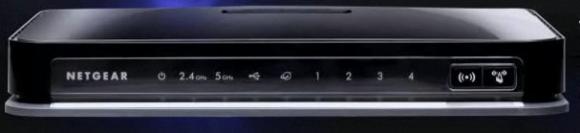
Here are some of the areas in which the WNDR3700 excels:
- Wi-Fi throughput and range in both 2.4 GHz and 5 GHz bands
- Total Simultaneous dual band Wi-Fi speeds when both networks are running at the same time, which stresses the CPU the most
- WAN to LAN speed
- Speed of USB external hard drive data transfer
- Minimizing packet loss in Video network mode
- Maximum number of simultaneous connections
Top Performance Engineering and Components
- A Powerful 680 MHz I/O efficient 24K MIPS processor - one of the most powerful in the consumer category router today
- High-end power amplifiers are included in the Wi-Fi Radio electronics
- Ultra-sensitive 8 internal metamaterial antennas fine tuned for each frequency
- Filters to ensure co-existence with other wireless networks.
It is recommended to use the WNDR3700 with a matching dual band Wireless-N client (embedded or external.) WNHDE111 5 GHz Wireless-N Ethernet Bridge or WNDA3100 dual band Wireless-N USB adapter can also be used as clients. Please upgrade to the latest firmware for all NETGEAR products at support.netgear.com
ReadySHARE
ReadySHARE allows you to easily share USB storage devices connected to the router to other computers in your home network or over the Internet.
ReadyDLNA
WNDR3700 is ReadyDLNA, which means any media files in the USB hard drive connected to the USB port of the WNDR3700 can now be viewed and played in any UPnP (Universal Plug and Play) compliant media players like NETGEAR's Digital Entertainer Live (EVA2000) or DLNA (Digital Living Network Alliance) compliant Media players like Xbox360, PlayStation3 and TVs like Sony Bravia.
The Media Server name is ReadyDLNA: WNDR3700 and it automatically scans for new media in the hard drive.
Wi-Fi Speed and Range
High transmit power and sensitive antennas fine tuned for each frequency band provides superior range than other competing routers. In the NETGEAR rented home in San Jose, CA, at 197 Ft on the street through 5 internal walls and 1 external wall, the router still showed a steady 30 Mbps with Intel Centrino 5300 client at 2.4 GHz frequency band, enough to stream a HD Video stream.
WAN to LAN Speed
Both TCP and UDP performance in both downlink and uplink directions are in the 400-550 Mbps range with the firewall enabled.
Simultaneous Session Test
When both Wi-Fi networks (2.4 GHz and 5 GHz) are connected to clients and passing network traffic at the same time, the CPU is usually the bottleneck as it has to process multiple streams of 802.11n traffic. However, with the 680 MHz CPU, WNDR3700 can deliver almost twice the Wi-Fi performance while operating in simultaneous dual band mode compared to when operating in only single band mode.
Plug and Play USB Hard Drive Access
Accessing a USB hard drive connected to the WNDR3700 is plug and play - simply connect a USB hard drive to the WNDR3700 and immediately get access to the USB hard drive just like a network attached storage (NAS) device - all without any configuration or PC software installation.
NETGEAR has also provided a helpful utility in the Installation CD to access and map the hard drive using the ReadyShareConnect. Alternatively, simply type \\readyshare at Start -> Run when your PC is connected to the WNDR3700, either wired or wireless.
As CPU horsepower and plenty of memory is a prerequisite for good USB access performance, WNDR3700 has a read/write speed in the range of 70-100 Mbps, based on the file type. This is enabled by the 680 MHz enhanced I/O processor and 64 MB RAM. Highest performance can be observed in the FAT32 file system; however, it supports the most common file systems including FAT32, FAT16, NTFS, EXT2 and EXT3.
WNDR3700 also supports FTP and HTTP mode to access the content of the USB hard drive connected to the router from outside your home or business. In the router GUI, under the Advanced USB settings, you can initiate http and FTP access to the USB hard drive. You will see the WAN side IP address you need to use to get access to the USB hard drive content when you are travelling, either from your computer or from your Mobile Phone.
Broadband Usage Meter
The Broadband usage meter can be accessed by logging onto the Router GUI http://192.168.1.1 with login: admin and password: password) and selecting the Traffic Meter tab under the Advanced section. Daily, weekly and monthly usage levels can be measured with customized alerts. V1.0.4.31 build only supports PPPoE and PPPoA traffic and recently uploaded V1.0.4.35 supports supports DHCP traffic meter (Which you will need for Comcast)
Multiple SSID/Guest Network
WNDR3700 supports up to a total of 4 networks, 2 on the 2.4 GHz band and 2 on the 5 GHz band. To enable Multiple SSID, log-on to the router GUI and click on the Guest Networks tab on the left. You can create additional networks in 2.4 GHz network or 5 GHz network, provide separate security password for each and also enable SSID broadcast and access to the local LAN along with enabling Video Mode for a specific network.
Optimum Power Consumption
In the Router GUI, under Advanced Wireless Settings, user can now control the transmit power levels as well. Users can select up to 4 power levels.
Set up Video Network
Transferring reliable Video of Wi-Fi has been the biggest challenge for end users. Inherently, the requirements for data and video transfer are different. While the goal for data transfer is to send data at the fastest possible data rate over TCP, any packet loss has minimal impact as re-transmit happens. Likewise Wi-Fi networks including 802.11n tries to maximize data rate using block transfers, highest link rate etc.
Video, on the other hand, needs a sustained bandwidth while reducing packet loss and jitters. Many video transfers occur in UDP mode where there are no re-transmits.
Selecting the "Enable Video Network", either in the 5 GHz default network or on any additional 5 GHz network, enables the video algorithms that enables higher quality video transfer by maintaining a solid link rate, reducing aggregation and hence minimizing packet loss and jitter.
Language Selection
During installation or when you log on to the router GUI, users can now select their own language, selecting from a drop down menu of close to 20 languages!