

This article describes how to use the switch boot menu to recover the admin password and, optionally, the enable password (that is, the privileged EXEC password) of an M4250 series or M4350 series fully managed switch.
To recover the admin password and, optionally, the enable password on an M4250 series or M4350 series fully managed switch:
- Open a console connection to the switch using a terminal emulation program with these settings:
- Speed (baud): 115200
- Data bits: 8
- Stop bits: 1
- Parity: None
- Flow control: XON/XOFF
- Reboot the switch and monitor the console output closely.
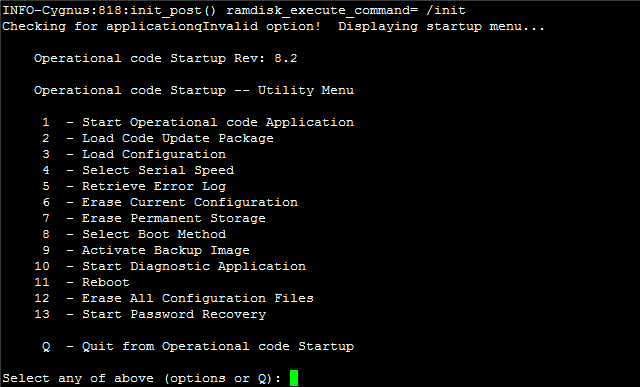
- As soon as Checking for application displays, press and hold the 2 key on your keyboard to interrupt the normal boot cycle.
- Hold the 2 key until the boot menu displays.
- In the boot menu, type 13 and press Enter.
A screen similar to the following screen displays.
- The switch boots into password recovery mode. When prompted for a user name, press Enter to enter the Privileged EXEC mode:
Applying Global Configuration, please wait ...
Applying Interface Configuration, please wait ...
Box is in recovery mode; Please configure password for admin
Box is in recovery mode; Please configure password for enable mode
User:
(NETGEAR switch)
- Type configure and press Enter to change to the configuration mode (Config mode).
(NETGEAR switch) #configure
(NETGEAR switch) (Config) #
- To reset the admin password, enter the following command:
(NETGEAR switch) (Config) #username admin password <password>
Replace <password> with the password of your choice.
- Type exit and then press Enter to exit the Config mode.
(NETGEAR switch) (Config) exit
(NETGEAR switch) #
- (Optional) To reset the Privileged EXEC password, type the following command:
(NETGEAR switch) #enable password <password>
Replace <password> with the password of your choice.
- Type save and press Enter to save the changes. When prompted, type Y.
(NETGEAR switch) #save
This operation may take a few minutes.
Management interfaces will not be available during this time.
Are you sure you want to save? (y/n) y
Config file 'startup-config' created successfully.
Configuration Saved!
- Type reload cand press Enter to reboot the switch. When prompted, type Y.
(NETGEAR switch) #reload
Are you sure you want to reload the switch? (y/n) y
- When the switch completes its reboot, access it using your new password.
Last Updated:07/07/2025
|
Article ID: 000067268