

Your NETGEAR Nighthawk M5 Mobile Hotspot uses a nano-SIM (4FF SIM) card. In some cases, your M5 may come with a pre-installed SIM. For example, the AT&T variant of M5 Mobile Hotspot comes with SIM card pre-installed.
If your device did not come with a pre-installed SIM card please follow steps below to insert your SIM card into your Nighthawk M5 Mobile Hotspot.
To insert the micro-SIM into your M5:
- Ensure that you have a nano-SIM (4FF) with an active data plan.
- If the device is brand new out of the box please proceed to step 3. If your device is fully assembled please disassemble the device by removing the battery cover and the battery.
- Turn your device over and locate the SIM slot.
- Make sure your SIM card contacts are facing down towards the SIM contact of the device and gently slide the SIM into the SIM slot as shown below.
Note: The SIM card can only be inserted one way, do not force the SIM card into the device from the other side of the SIM opening as this can damage the SIM contacts on the product.
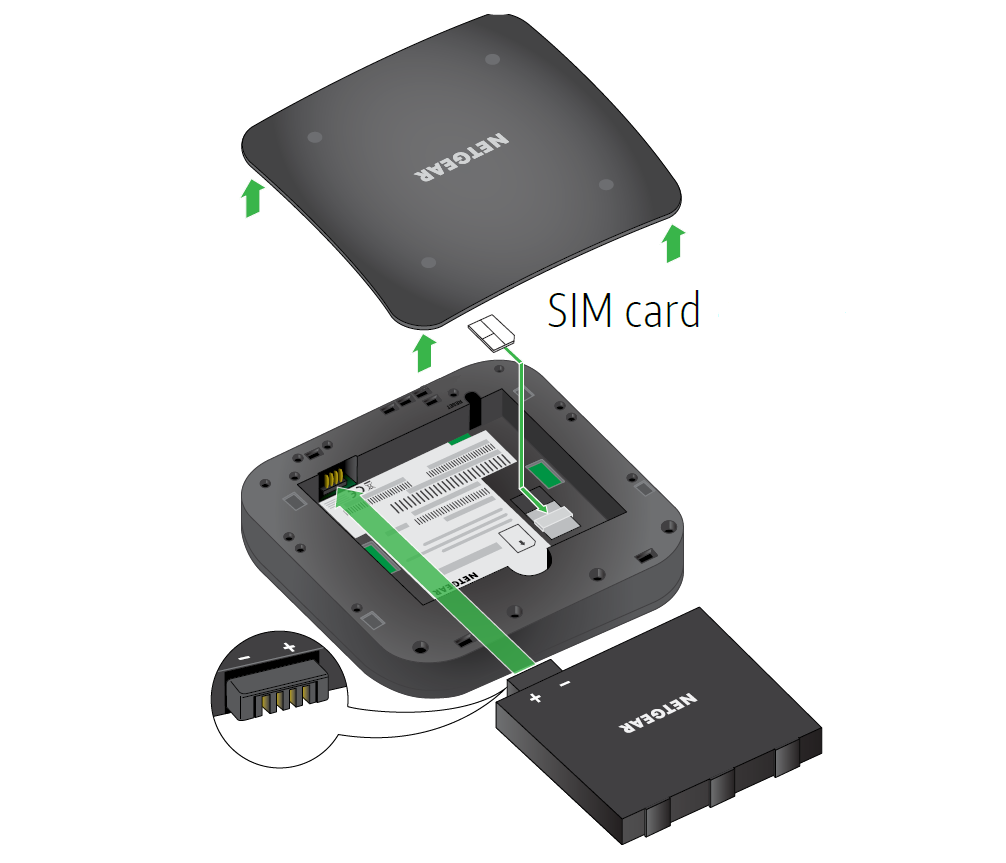
- Once the SIM card has been inserted, insert the device battery.
- Put the battery cover on your M5.
- Once the M5 has been fully assembled you are ready to complete the setup.
Last Updated:07/07/2025
|
Article ID: 000062068