

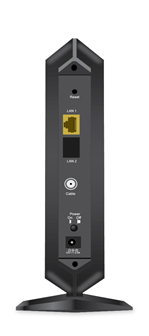
Your CM1100 has two Ethernet ports located on the back of your modem. You can use LAN1 to connect an Ethernet device to your cable modem. LAN2 (covered) can only be used in conjunction with LAN1 as part of a Link Aggregation Group (LAG). A LAG enables you to achieve a faster connection between your modem and a connected Ethernet device.
Your CM1100 can only support one wired Ethernet connection at a time.
For more information:
- How can I troubleshoot my cable modem?
- Why is there a cover over one Ethernet port of my NETGEAR Nighthawk CM1100 Multi-Gig Speed Cable Modem?
- What are link aggregation and LACP and how can I use them in my network?
- How do I set up Ethernet port aggregation on my NETGEAR Nighthawk CM1100 Multi-gig Speed Cable Modem?
Last Updated:07/07/2025
|
Article ID: 000060403