

How to complete hot-swap slot changes on M4300-96X?
Overview:
The M4300-96X slot can be hot-swapped. However, use of different model slot type requires the user to reconfigure and reset the slot configuration. Below we provide example A and B that cover the basic hot-swap scenarios.
Scenarios:
Example A: Card of the same type
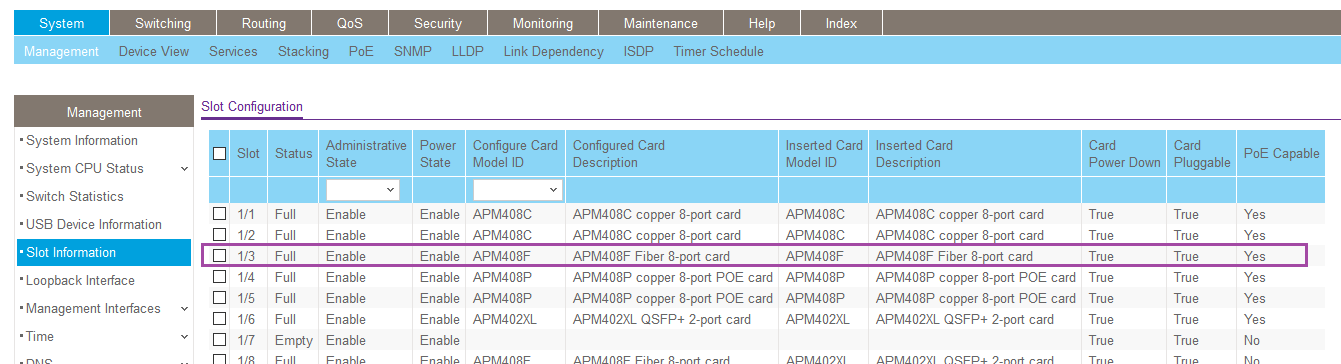
In this example the failed card is an APM408F, we are going to hot swap with a replacement APM408F
This condition does not require reconfiguration of slot, this swap type is considered hot-swap.

In the CLI:
(M4300-96X) #show slot 1/3
Slot.............................. 1/3
Slot Status....................... Full
Admin State....................... Enable
Power State....................... Enable
Inserted Card:
Model Identifier............... APM408F
Card Description............... APM408F Fiber 8-port card
Configured Card:
Model Identifier............... APM408F
Card Description............... APM408F Fiber 8-port card
Pluggable......................... Yes
Power Down........................ Yes
In the Web interface:
Example B: Card of a different type
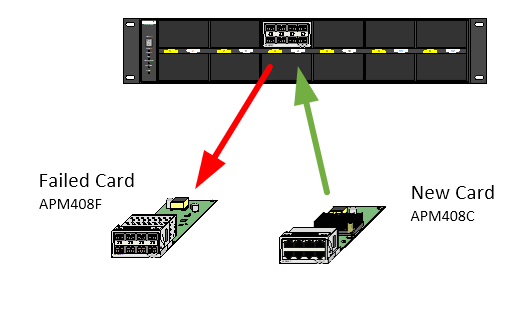
In this example the failed card is an APM408F, we are going to hot swap with a replacement APM408C. Hot-swapping with a different card type requires following the steps in order to prevent mismatch of configuration resulting in errors.
TRAPMGR[cmgrTask]: traputil.c(795) 607 %% Card Mismatch: Unit:1 Slot:3 Inserted-Card: APM408P copper 8-port POE card Config-Card: APM408C copper 8-port card
This condition does require reconfiguration of the slot ID OR reboot to refresh the slot information, this swap type is considered NOT hot-swap.
In the CLI:
(M4300-96X) #show slot 1/3
Slot.............................. 1/3
Slot Status....................... Full
Admin State....................... Enable
Power State....................... Enable
Inserted Card:
Model Identifier............... APM408C <---------- Card Mismatch
Card Description............... APM408C copper 8-port card
Configured Card:
Model Identifier............... APM408F <---------- Card Mismatch
Card Description............... APM408F Fiber 8-port card
Pluggable......................... Yes
Power Down........................ Yes
You can see in the output above that the card inserted does not match the card configured.
In the Web interface, this will look like
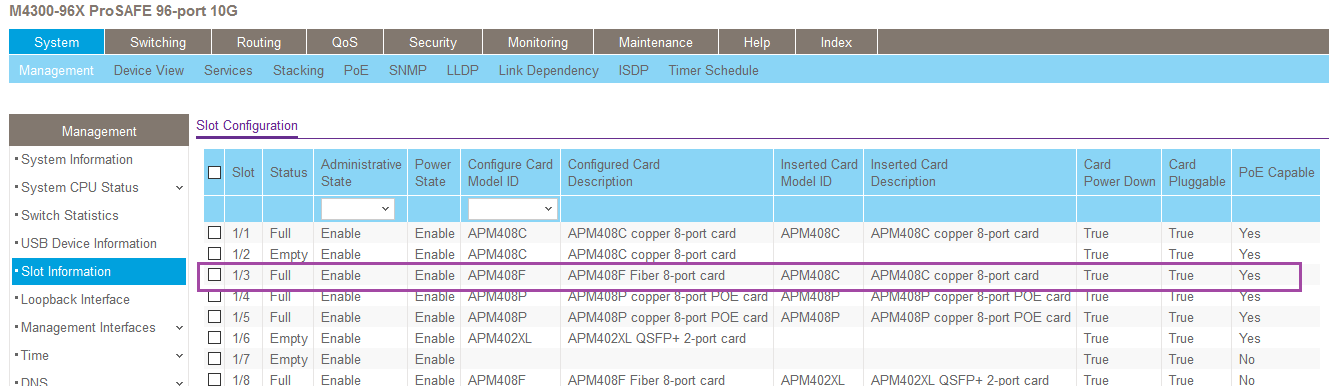
To correct the mismatch, as shown above, we can issue a slot reset. This will reset the slot ID to the inserted card type.
Slot reset via CLI:
(M4300-96X) #configure
(M4300-96X) (Config)#no slot 1/3
(M4300-96X) (Config)#exit
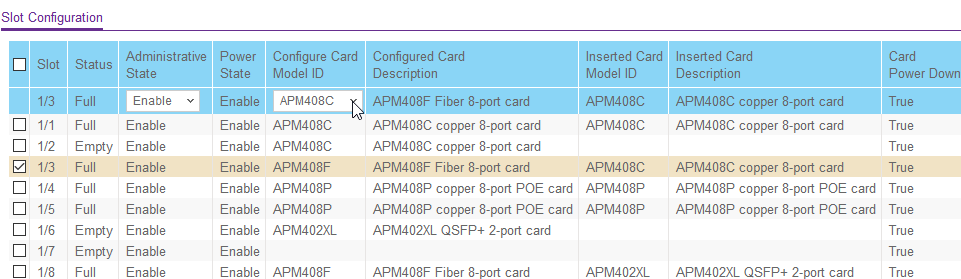
Slot reset via Web UI:
- Browse to System>Management>Slot Information
- Click drop down for Configure Car Model ID
- Select card type
- Check box next to the slot
- Click apply
How to reload the switch stack?
if the configured card has not changed to the inserted card after the configuration changes have been made we must reboot the stack.
Web UI
- Browser to Maintenance> Reset> Device Reboot
- Make sure radial is entered in for "Save prior to reboot"
- Click apply
In CLI
(M4300-96X) #reload
Management switch has unsaved changes.
Would you like to save them now? (y/n) y
Config file 'startup-config' created successfully
Configuration Saved!
Are you sure you want to reload the stack? (y/n) y
Switch stack will reboot.