

To install an additional PSU:
- Pull out the cover plate from the power module bay in which you want to insert the additional PSU.
- Insert the additional PSU into the power module bay, and gently push the PSU into the bay.
CAUTION: When inserting the PSU, do not use unnecessary force. Doing so can damage the connectors on the back of the PSU and on the midplane. - Connect the end of the power cord to the power receptacle on the PSU.
- Plug the AC power cord into a power source such as a wall socket or power strip.
- When you apply power, both the AC OK LED on the PSU and the switch’s Power LED that is associated with the power supply bay light. If these LEDs do not light, make sure that the power cord is plugged in correctly and that the power source is good.
To replace a PSU:
- If your switch functions with a single PSU only, disconnect the power cord from the PSU and let the switch power down.
If your switch functions with more than one PSU, you do not need to power down the switch and you can perform a hot swap. - Remove the PSU from the power module bay by moving the orange release latch to the left and pulling the extraction handle.
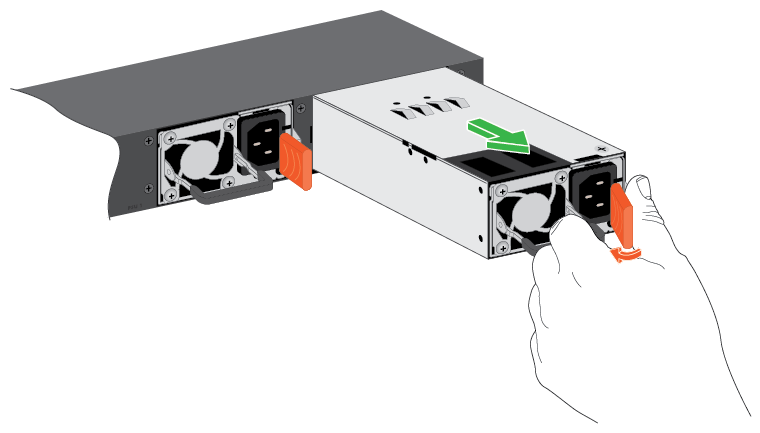
- Insert the replacement PSU into the power module bay, and gently push the PSU into the bay until the latch locks.
CAUTION: When inserting the PSU, do not use unnecessary force. Doing so can damage the connectors on the back of the PSU and on the midplane. - Connect the end of the power cord to the power receptacle on the PSU.
- Plug the AC power cord into a power source such as a wall socket or power strip.
When you apply power, both the AC OK LED on the PSU and the switch’s Power LED that is associated with the power supply bay light. If these LEDs do not light, make sure that the power is plugged in correctly and that the power source is good.
For more information about compatible PSUs and PSU configurations, see What power supply unit (PSU) configurations are possible for my NETGEAR M4300-96X switch?.
To purchase PSUs for your M4300-96x, visit the following product pages:
Last Updated:07/07/2025
|
Article ID: 000057104