

There is a potential issue (switching continuously rebooting) when upgrade S3300’s firmware to 6.6.x.x from 6.4.0.x if reboot when 6.4.0.x is as active and 6.6.x.x as backup.
To avoid this issue on 6.4.0.x, please do download v6.6.x.x to both active and inactive (backup) images when upgrading from v6.4.0.x firmware.
Below instruction shows a detailed steps on upgrading firmware v6.6.x.x (e.g. 6.6.4.7) from v6.4.0.x via HTTP.
- Download the new firmware 6.6.4.7 from NETGEAR product support Website and store it in local PC, and remember its location in the PC’s file system. Then unzip it to get the switch image “s3300v6.6.4.7.stk”.
Notes: The released zip contains switch firmware (s3300v6.6.4.7.stk) and MIB files. Please unzip the file to extract the switch image for firmware upgrade. - Go to GUI page “Maintenance > Download > HTTP File Download”, set File Type as ‘Archive’, set Image Name as ‘Image1’, select the firmware file ‘s3300v6.6.4.7.stk’ stored in local PC via Browser button, then click Apply button to start firmware downloading.
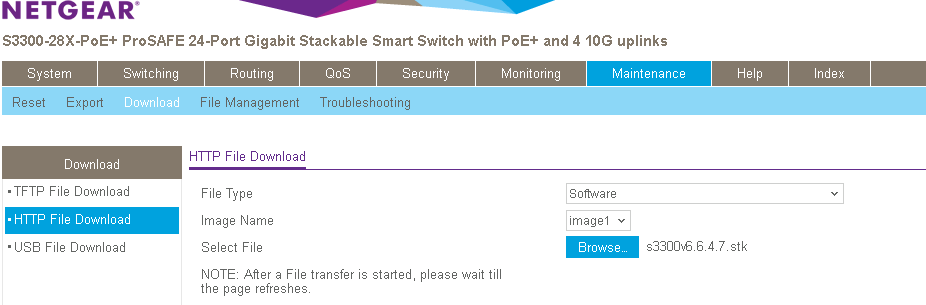 The download will take several minutes. Do not power cycle the switch before and the success message shows up as below.

- Repeat step3, via setting ‘Image Name’ to ‘image2’, to downloading the switch image “s3300v6.6.4.7.stk” to image2.
- Go to GUI page “Maintenance > File Management > Dual Image > Dual Image Status’, to double check 6.6.4.7 is correctly downloaded to both image1 and image2. If not, go back to step 3 and 4 to download the switch image again.
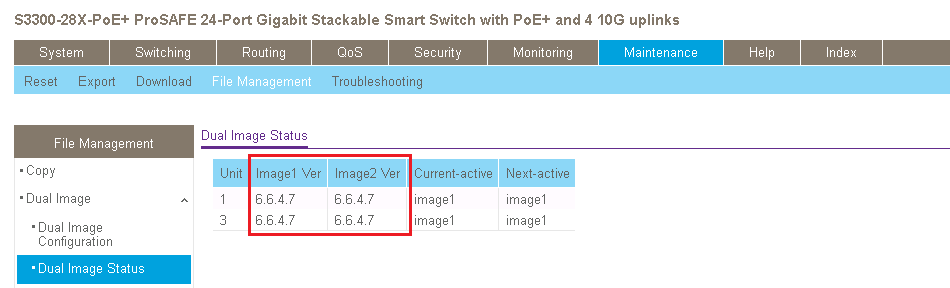
- Go to GUI page ‘Maintenance > Reset > Device Reboot’, set ‘Reboot Unit No.’ as ‘All’ (default option); check the checkbox then click Apply button.
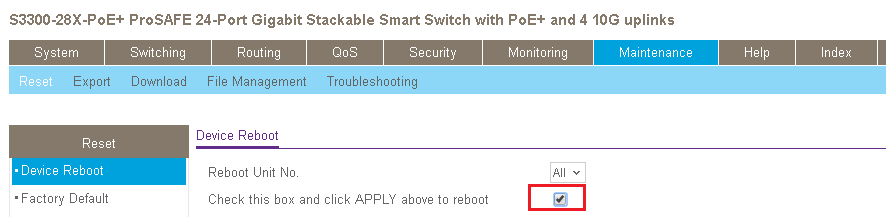
The restart may take several minutes, do not power cycle or reboot the switch before the process is complete.
- After the switch is restarted, login the switch to double check whether the FW is upgraded correctly, via GUI page of “GUI page System > Management > System Information”.
Notes: Please clear the browser’s cache to re-login the switch via Web GUI after upgrading firmware to v6.6.4.7 from v6.4.0.19 firmware.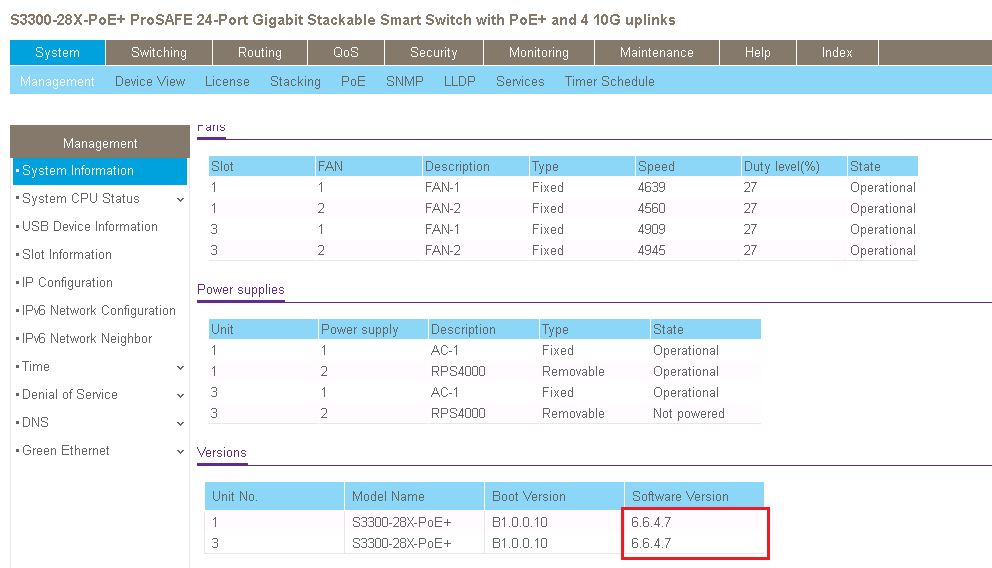
Last Updated:07/07/2025
|
Article ID: 000051465