

Your Orbi satellite automatically connects wirelessly to your Orbi router or another Orbi satellite to create a wireless backhaul, or you can use an Ethernet cable to connect your satellite to your router or another satellite to create a wired backhaul connection.
Before you set up an Ethernet backhaul connection, make sure that you update the firmware on all your Orbi devices. For more information, visit How do I update the firmware on my Orbi router and satellite?
The following image shows how to connect your Orbi satellites to your Orbi router using star topology to create an Ethernet backhaul connection.

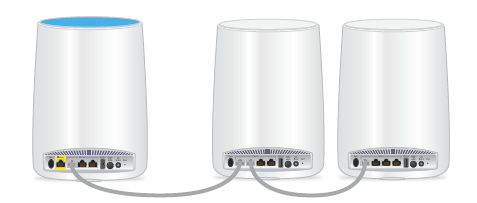
The following image shows how to connect your Orbi satellites to your Orbi router using daisy chain topology to create an Ethernet backhaul connection.
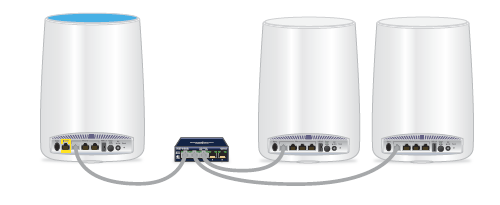
The following image shows how to connect your Orbi satellites and your Orbi router to an Ethernet switch.
Note: The Ethernet ports on your Orbi satellites and Orbi router are rated at 1 Gbps. Make sure that the switch ports are 1 Gbps or faster.