

If you want to connect your Orbi Pro router to an existing modem, we recommend that you turn off your existing modem’s WiFi.
To set up your router with your modem:
- Unplug your modem’s power, leaving the modem connected to the wall jack for your Internet service.
If you modem uses a battery backup, remover the battery then reinsert it. - Plug in and turn on your modem.
- Connect your modem to the Internet port of your router with the Ethernet cable that came with your router.
- Connect the power adapter to your router and plug the power adapter into an outlet.
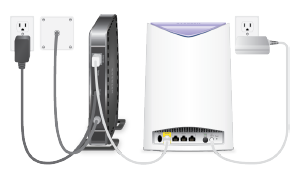
- If the Orib Pro router’s Power LED does not light, press the Power On/Off button on the rear panel of the Orbi Pro router.
Last Updated:07/07/2025
|
Article ID: 000046305