

If you have a smartphone, we recommend using the Nighthawk app to install your NETGEAR cable modem router. If you are installing an Orbi WiFi System, we recommend using the Orbi app. For more information, see the following articles:
Before you begin, make sure that you have your cable Internet service provider (ISP) account information, such as your account mobile phone number, user name, password, and account number, and the modem router’s MAC address (on the modem router label). You might need this information to activate your cable modem router.
To install your NETGEAR cable modem router using the router web interface:
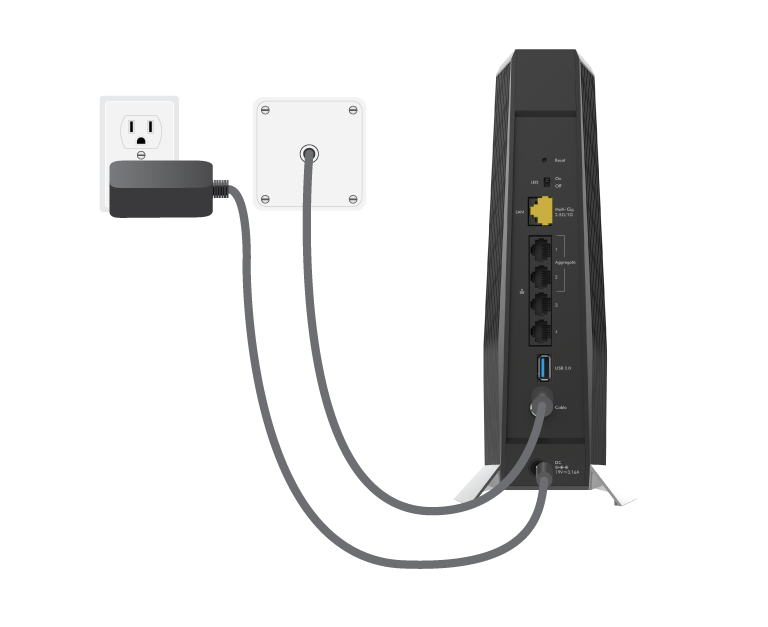
- Using a coaxial cable, connect your cable wall outlet to the coaxial cable connector on the back of your NETGEAR modem router.
We recommend connecting directly to the cable wall outlet. If you must share the connection, use a 3.5dB (1 to 2) splitter. - Connect the power adapter to your modem router and plug the power adapter into an electrical outlet.
Your modem router powers on. - Wait for the
 (Online) LED to light solid white for at least one minute.
Note: This process might take up to 10 minutes and the modem router might reset several times. - Connect your computer or mobile device to the modem router with WiFi or Ethernet:
- WiFi: Use the WiFi network name (SSID) and password on the modem router label to connect.
- Ethernet: Use an Ethernet cable to connect a computer to an Ethernet port on the modem router.
- Launch a web browser and enter routerlogin.net or 192.168.1.1 in the address field.
- When the Activate Internet Service page displays, select your ISP.
The page displays information that your ISP might need to activate your modem router. - Follow your ISP’s online activation procedure or call your ISP for activation.
- After activation is complete and the Internet Status is ONLINE in the browser, click or tap NEXT.
The NETGEAR account page displays. - Follow the prompts to do the following:
- Change your modem router’s admin credentials and set up security questions.
- Review your WiFi network name and password.
Last Updated:07/07/2025
|
Article ID: 000038886