

Some SC101/SC101T commands and information are available only through the CLI. Compared to the Wizard, using the CLI is a very fast way to check the basic status of your SC101/SC101T.
Using SC101/SC101T CLI commands:
- Type Start > Run > command. (In Windows 2000 or Windows XP, Start > Run > cmd). A black and white window pops up, with a blinking cursor after the prompt (the prompt ends with a greater than sign ">").
- Type cd c:\Program Files\NETGEAR\SC101*
This changes the directory. It also changes the prompt, so you can see what directory you are in. - Type ut listall, then Enter. Your computer responds with a screen of data similar to:
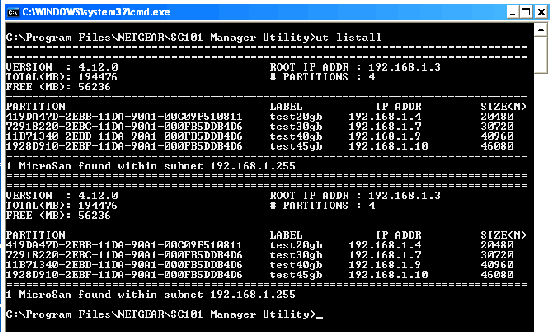
This is an overview of all the disks and partitions in your SC101/SC101T. Notice that the information is divided above and below the double line of "====", one group for each of the two physical hard disks placed in this example SC101/SC101T.- # PARTITIONS is the number of partitions you have created on each hard drive. In this example, there are four partitions, each with a line of characters. If you just created one partition, there would be one line.
- PARTITION is an unique network identifier for each partition. (This is the same value that appears in the "ut getpart" command as UNIQUE NAME.)
- LABEL is what you named each partition. In this example, the first partition is "test20gb".
- IP ADDR is the IP address of each partition on your network.
- SIZE(M) is the size in MB of each partition. The first partition is 20,480 MB, that is, 20 GB.
- MicroSan found within subnet is either:
-
- "1 MicroSan found within subnet" = 1 physical hard disk, or 2 physical hard disks which are mirrored.
- "2 MicroSan found within subnet" = 2 physical hard disks, which are not mirrored.
Notice that the same LABEL and PARTITION appear on the top and bottom half. This SC101/SC101T is mirrored. If it was not mirrored, then the information on the top and bottom would not match, but would correspond to how you partitioned each SC101/SC101T disk, separately.
- Type ut. The list of CLI commands for the SC101/SC101T appears.
- All commands start with "ut", e.g., "ut listall". Most commands require being followed by the rootAddr and other information such as the partitionAddr, the roottoken, or a filename.
- rootAddr = "ROOT IP ADDR" from the "ut listall" command.
- partitionAddr = "IP ADDR" from the "ut listall" command, in the PARTITION section.
- roottoken = The SC101/SC101T administration password. If you have not changed it from the default, it's password.
- filename = The filename of a file that you wish to put on the SC101/SC101T.

If a CLI is inside of a Windows pop-up, you can close it by typing exit then RETURN. It doesn't do any harm to leave it open, if you might want it later.
Note: This device ceased manufacture in 2009. Editor Aug 2014
Last Updated:07/07/2025
|
Article ID: 000029004