

- Login to your NETGEAR ProSAFE Switch.
- Select Switching > Multicast > IGMP Snooping .
A screen similar to the following displays.
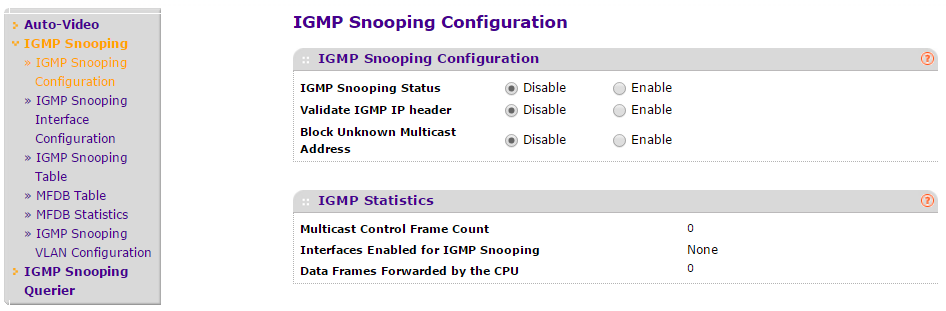
- Enable IGMP snooping on VLAN 1.
- Select Switching > Multicast > IGMP Snooping > IGMP VLAN Configuration.
A screen similar to the following displays.

- Enter the following information:
- In the VLAN ID field, enter 1.
- In the Admin Mode field, select Enable.
- Click Add.
- Select Switching > Multicast > IGMP Snooping > IGMP VLAN Configuration.
- Enable the IGMP snooping querier globally.
- Select Switching > Multicast > IGMP Snooping Querier > Querier Configuration.
A screen similar to the following displays.

- Enter the following information:
- For Querier Admin Mode, select the Enable radio button.
- In the Querier IP Address field, enter 10.10.10.1.
- Click Apply.
- Select Switching > Multicast > IGMP Snooping Querier > Querier Configuration.
- Enable the IGMP snooping querier on VLAN 1.
- Select Switching > Multicast > IGMP Snooping Querier > Querier VLAN Configuration.
A screen similar to the following displays.

- In the VLAN ID field, enter 1.
- Select Switching > Multicast > IGMP Snooping Querier > Querier VLAN Configuration.
- Click Add.
For more information, see the following support article:
Support Warranty
Here you can find the registering your product
View our step by step guide for
For Initial 90 Days Phone, Email, Chat, or if you need help with Registration, reach us at our Contact Us Page.
Online support is available via the Switching Community Forum.
Last Updated:07/07/2025
|
Article ID: 29999