

To enable LACP on your ReadyNAS:
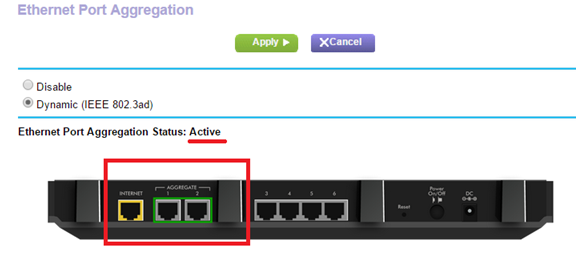
- Use Ethernet cables to connect the ReadyNAS to Ethernet port 1 and port 2 on the router.
- Launch a web browser from a computer or wireless device that is connected to the network.
- Enter ReadyNAS_IP_address/admin (ex. 10.0.0.100/admin). A login screen displays.
- Enter the ReadyNAS username and password.
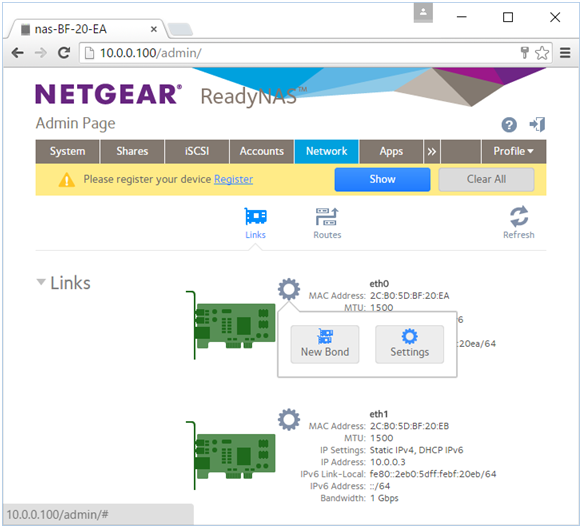
- Click Network then the gear icon.
- Click New Bond.
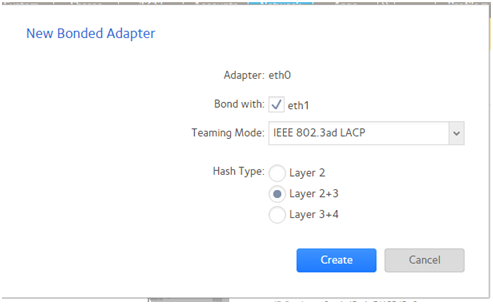
- Tick Bond with box then set the Teaming Mode and Hash Type as below.
- Click Create.
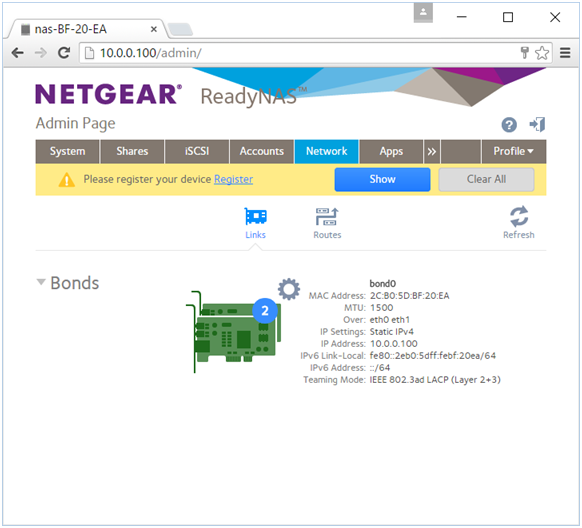
- Go back to the router's UI and check if Port Aggregation status is now Active.
Related articles:
- Port Aggregation with Synology NAS on your Nighthawk router
- Port Aggregation with QNAP NAS on your Nighthawk router
Last Updated:07/08/2025
|
Article ID: 29842