

For information about the Smart Control Center feature, see the “What is the Smart Control Center on a smart switch
To discover a smart switch through the Smart Control Center:
- On the computer on which the Smart Control Center is installed, turn off the firewall temporarily.
The firewall might prevent the Smart Control Center from discovering the smart switch.
- Start the Smart Control Center by double-clicking the Smart Control Center icon on your desktop or by clicking the icon in the Windows Start menu.
The Network screen displays and the Smart Control Center discovers the smart switch and other devices in the network.
- If the discovery function of the Smart Control Center does not operate automatically when you start the Smart Control Center, click the Discover button.
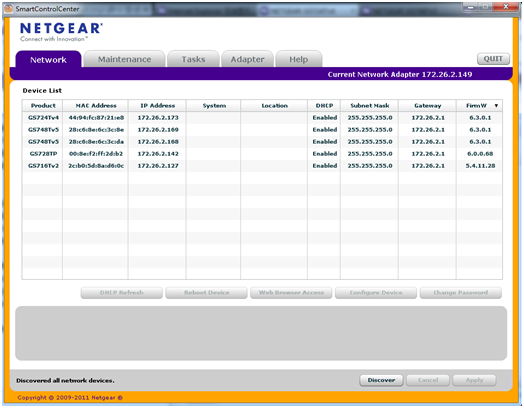
The Smart Control Center discovers the smart switch and other devices and displays their MAC addresses, IP addresses, and model numbers.
- If the Smart Control Center does not discover your smart switch, verify that the cable connections are secure and that the IP address configuration of the computer on which the Smart Control Center is installed is in the same subnet as the smart switch, and click the Discover button again.
Last Updated:07/07/2025
|
Article ID: 24696