

WN2000RPTv3 is a Wireless-N extender that is capable of removing dead Wi-Fi spots. This device can extend the wireless network outside the range of your existing wireless network. It has a maximum of 300Mbps connection speed, depending on the router.
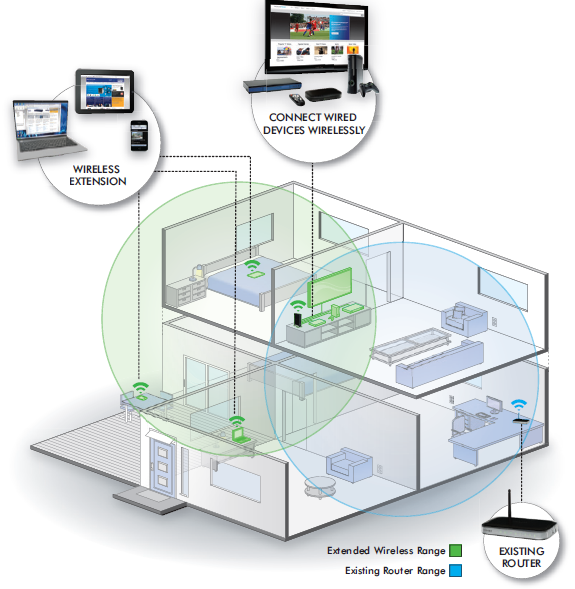
How to install the WN2000RPTv3:
When setting up your Range Extender, NETGEAR recommends that you bring the device into the same room as your wireless router. Once the setup is complete and verified as having a working connection to the wireless router, move the extender to its intended location.

Note: When moving the extender to a different location, make sure to place it within the range of the wireless router.
Plug the power supply of the extender and wait for the Status light to turn green.
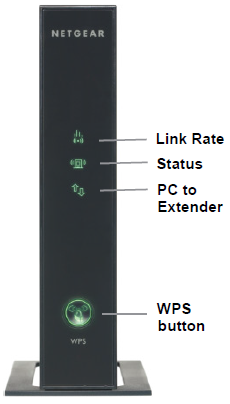
You now have two options to use for setup of the extender:
Option 1; Connect via WPS (Wi-Fi Protected Setup):
Note: Ensure your router supports WPS. If it does not, skip to Option 2.
- Press the WPS button on the WN2000RPTv3 and wait for it to start blinking.
- Press the WPS button on your router within two minutes.
- Once the WPS lights on both devices stop blinking, ensure the Link Rate LED is lit.
- Connect to the extender wireless network (SSID with _EXT at the end; Example: ROUTER_EXT). Use the same passphrase/network key as your main wireless network.
- If you want to make changes on the extender, go to www.mywifiext.net. If prompted, log in as admin with password as the password.
Option 2; Connect via Web browser setup:
- Go to one of your wireless devices and look for the network NETGEAR_EXT. This network is not secured so you can easily connect to it.

- Once connected, the PC to Extender light should turn on.
- Open your web browser and type www.mywifiext.net. NETGEAR genie displays and prompts you to either go on with the procedure or manually configure the extender.
Click Yes and then Next.

- Select your network and click Continue.

- Enter the wireless password for your existing wireless network.
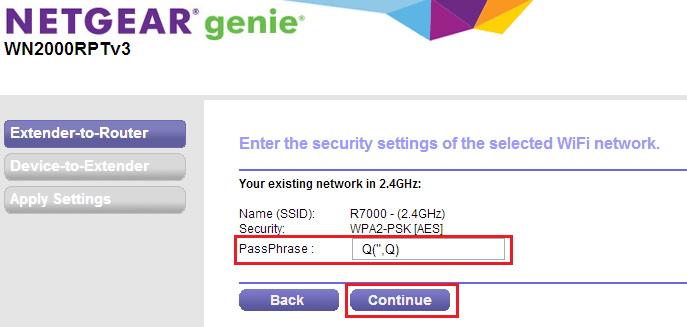
- Select Use the same security mode and password as those for the existing network. Click Continue.

- Select My wireless devices are connected to the Extender network. Click Continue.
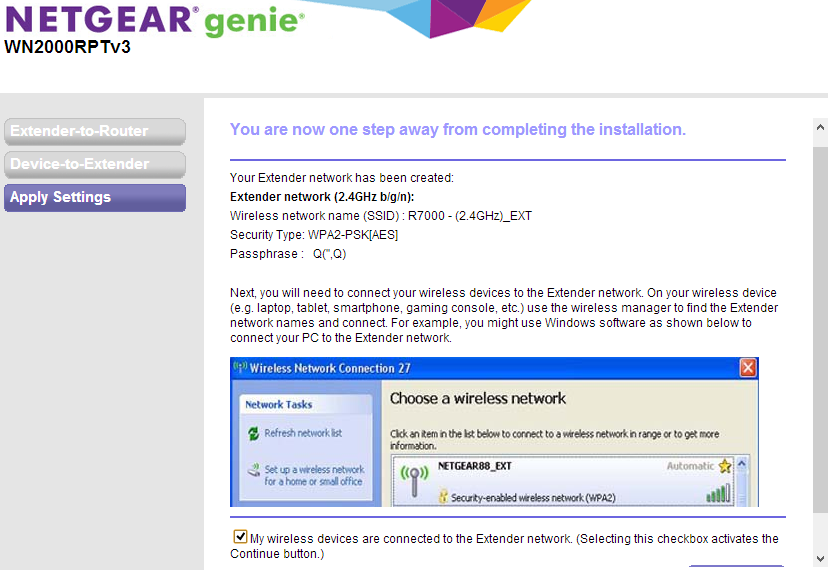
- Click Finish.

- If you need to make changes after using the web browser setup, go to www.mywifiext.net. If prompted, log in as admin with password as the password.