

The maximum transmission unit (MTU) is the largest data packet a network device transmits. When one network device communicates across the Internet with another, the data packets travel through many devices along the way. If a device in the data path has a lower MTU setting than the other devices, the data packets must be split or "fragmented" to accommodate the device with the smallest MTU.
The best MTU setting for NETGEAR equipment is often the default value. In some situations, changing the value fixes one problem but causes another. Leave the MTU unchanged unless one of these situations occurs:
- You experience problems connecting to your ISP or other Internet service, and the technical support of either the ISP or NETGEAR recommends changing the MTU setting. These web-based applications might require an MTU change:
-
- A secure website that does not open, or displays only part of a web page
- Yahoo email
- MSN portal
- America Online's DSL service
- You use VPN and have severe performance problems.
- You used a program to optimize MTU for performance reasons, and now you have connectivity or performance problems.
Note: An incorrect MTU setting can cause Internet communication problems. For example, you might not be able to access certain websites, frames within websites, secure login pages, or FTP or POP servers.
To change the MTU size:
- Launch an Internet browser from a computer or wireless device that is connected to the network.
- Type http://www.routerlogin.net or http://www.routerlogin.com.
A login screen displays. - Enter the router user name and password.
The user name is admin. The default password is password. The user name and password are case-sensitive.
The BASIC Home screen displays. - Select ADVANCED > Setup > WAN Setup.
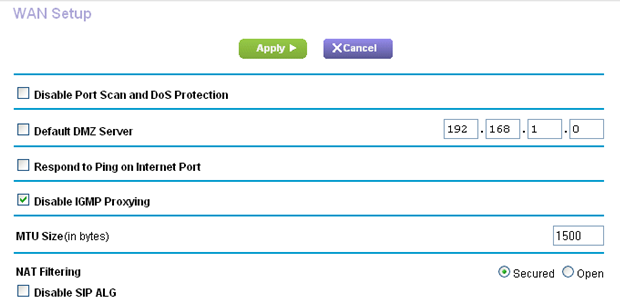
- In the MTU Size field, enter a value from 64 to 1500.
- Click the Apply button.
Your change is saved.
If you suspect an MTU problem, a common solution is to change the MTU to 1400. If you are willing to experiment, you can gradually reduce the MTU from the maximum value of 1500 until the problem goes away. The following table describes common MTU sizes and applicationsMTU
Application
1500
The largest Ethernet packet size. This setting is typical for connections that do not use PPPoE or VPN, and is the default value for NETGEAR routers, adapters, and switches.
1492
Used in PPPoE environments.
1472
Maximum size to use for pinging. (Larger packets are fragmented.)
1468
Used in some DHCP environments.
1460
Usable by AOL if you do not have large email attachments, for example.
1436
Used in PPTP environments or with VPN.
1400
Maximum size for AOL DSL.
576
Typical value to connect to dial-up ISPs.