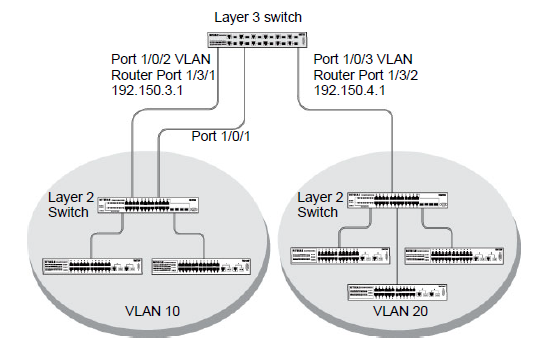
A VLAN is a set of end stations and the switch ports that connect them. You can have different reasons for the logical division, such as department or project membership. The only physical requirement is that the end station and the port to which it is connected both belong to the same VLAN.
Adding virtual LAN (VLAN) support to a Layer 2 switch offers some of the benefits of both bridging and routing. Like a bridge, a VLAN switch forwards traffic based on the Layer 2 header, which is fast. Like a router, it partitions the network into logical segments, which provides better administration, security, and management of multicast traffic.
Each VLAN in a network has an associated VLAN ID, which appears in the IEEE 802.1Q tag in the Layer 2 header of packets transmitted on a VLAN. An end station might omit the tag, or the VLAN portion of the tag, in which case the first switch port to receive the packet can either reject it or insert a tag using its default VLAN ID. A port can handle traffic for more than one VLAN, but it can support only one default VLAN ID.
The Private Edge VLAN feature lets you set protection between ports located on the switch. This means that a protected port cannot forward traffic to another protected port on the same switch. The feature does not provide protection between ports located on different switches.
The following diagram shows a Layer 3 switch with three ports configured to handle the traffic for two VLANs (VLAN 10 and VLAN 20). Ports 1/0/1 and 1/0/2 are part of a link aggregation group (LAG) for fault tolerance and increased throughput, and the LAG is a member of VLAN 10. Port 1/0/3 is a member of VLAN 20.