

ATA errors occur when the SATA controller of the ReadyNAS is unable to communicate with a hard disk.
The SATA controller of the ReadyNAS sends commands to the hard disk. When the controller cannot communicate with the disk, this may be as a result of an internal hardware error in the disk itself and may require replacement.
When the SATA controller cannot communicate with a disk in the chassis it records the errors in the ReadyNAS log file.
To identify if there is a disk in the chassis experiencing ATA errors please check the log file of the ReadyNAS.
Click for instructions on how to retrieve the log file .
RAIDiator 4 or 5
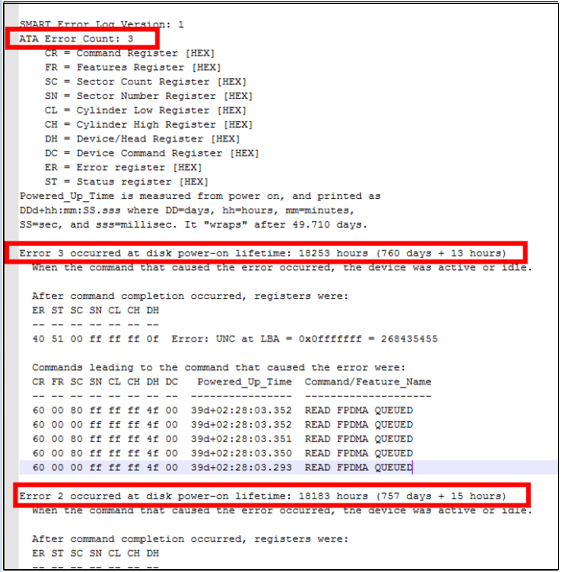
Check the Disk Smart log file.
For each disk listed in the log check SMART Error Log for ATA errors.
OS 6 ReadyNAS
Check the Disk Info log file
For each disk listed in the log check the Health Data: ATA Error Count
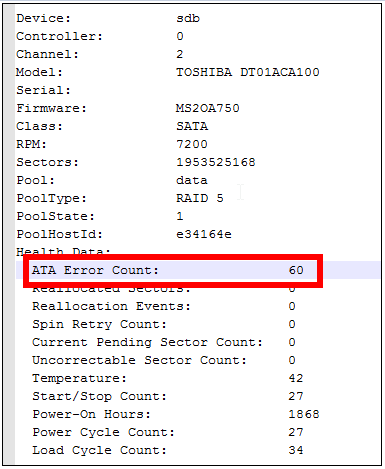
Cross reference with Status log will indicate if the ATA error is increasing on multiple occasions.
Disks replacement should only be considered when ATA error count is increasing on a regular basis.
Single ATA errors occurrences do not warrant disk replacement .
For example if a ReadyNAS is not powered down gracefully e.g. due to sudden power outage this may increase the ATA error count. The ATA error generated in this scenario should not be cause for concern.
Enabling email alerts is best practice to monitor status of disk and performance of the ReadyNAS.
Note: NETGEAR will only replace original disks that are supplied with ReadyNAS chassis.
Please ensure that your data volume (ideally backed up) is accessible before replacing any disk in the ReadyNAS. If data is not accessible do not replace the disk and contact support. Replacing a disk while another disk is failing may cause loss of data.
NETGEAR ReadyNAS have an inbuilt disk test facility. Please see this link for instructions on how to carry out a disk test for each model ReadyNAS -